dackey
July 11, 2023, 1:10pm
1
Hi !
I’ have a fisrt script who generate a HTML file(Array) in 4 servers, i need to Merge this 4 HTML files in one but using the Frame or iframe to have the Arrays side by side.
This first is working fine BUT i need to have all the HTML files.
$GE = "D:\VersionScriptsGE.html"
$GB = "D:\VersionScriptsGB.html"
$GH = "D:\VersionScriptsGH.html"
$GS = "D:\VersionScriptsGS.html"

$ContenuGE = Get-Content $GE
$ContenuGB = Get-Content $GB
$ContenuGH = Get-Content $GH
$ContenuGS = Get-Content $GS


# Combinaison de toutes les pages HTML des Guichets
$VersionScripts = @"
<!DOCTYPE html>
<html>
<head>
  <title>Version des scripts des Guichets de la ""</title>
  <style>
  h1, h5, th {text-align: center;}
    .image-container{
        display: flex;
        width: 100%;
    }

    .image-container iframe{
        width= 25%;
        height: 400px;
        border: auto;
    }
  </style>
</head>
<body>
    <h1>Version des scripts de la ""</h1>
    <center><div classs="iframe-container">
    <iframe src="<div>$ContenuGE</div>" width="400" height="850"></iframe>"
    <iframe src="<div>$ContenuGB</div>" width="400" height="850"></iframe>"
    <iframe src="<div>$ContenuGH</div>" width="400" height="850"></iframe>"
    <iframe src="<div>$ContenuGS</div>" width="400" height="850"></iframe>"
    </div></center>
</body>
</html>
"@

# Enregistrer le contenu dans un fichier HTML
$VersionScripts | Out-File -FilePath "D:\VersionScripts.html"
I want to do Merge the 4 HTML Files GE/GB/GH/GS in One
$GE = "D:\VersionScriptsCLUGE.html"
$GB = "D:\VersionScriptsCLUGB.html"
$GH = "D:\VersionScriptsCLUGH.html"
$GS = "D:\VersionScriptsCLUGS.html"

$ContenuGE = Get-Content $GE
$ContenuGB = Get-Content $GB
$ContenuGH = Get-Content $GH
$ContenuGS = Get-Content $GS


$contenuRegroupe = "<html><head><center><title>Versions des Scripts</title></center></head><body>"
$contenuRegroupe += "<iframe src='data:text/html;base64';width='25%' height='100%'>$($ContenuGE -join "`n")</iframe>"
$contenuRegroupe += "<iframe src='data:text/html;base64,$([System.Convert]::ToBase64String([System.Text.Encoding]::UTF8.GetBytes($ContenuGB -join "`n")))' width='25%' height='100%'></iframe>"
$contenuRegroupe += "<iframe src='data:text/html;base64,$([System.Convert]::ToBase64String([System.Text.Encoding]::UTF8.GetBytes($ContenuGH -join "`n")))' width='25%' height='100%'></iframe>"
$contenuRegroupe += "<iframe src='data:text/html;base64,$([System.Convert]::ToBase64String([System.Text.Encoding]::UTF8.GetBytes($ContenuGS -join "`n")))' width='25%' height='100%'></iframe>"
$contenuRegroupe += "</body></html>"

Set-Content -Path "D:\Check_PSTD\VersionScriptsPSTD.html" -Value $contenuRegroupe
Not Working…
$GE = "D:\VersionScriptsGE.html"
$GB = "D:\VersionScriptsGB.html"
$GH = "D:\VersionScriptsGH.html"
$GS = "D:\VersionScriptsGS.html"

$ContenuGE = Get-Content $GE
$ContenuGB = Get-Content $GB
$ContenuGH = Get-Content $GH
$ContenuGS = Get-Content $GS


# Combinaison de toutes les pages HTML des Guichets
$VersionScripts = @"
<!DOCTYPE html>
<html>
<head>
  <title>Version des scripts des Guichets de la ""</title>
  <style>
  h1, h5, th {text-align: center;}
    .image-container{
        display: flex;
        width: 100%;
    }

    .image-container iframe{
        width= 25%;
        height: 400px;
        border: auto;
    }
  </style>
</head>
<body>
    <h1>Version des scripts de la ""</h1>
    <center><div classs="iframe-container">
    <iframe src="<div>$ContenuGE</div>" width="400" height="850"></iframe>"
    <iframe src="<div>$ContenuGB</div>" width="400" height="850"></iframe>"
    <iframe src="<div>$ContenuGH</div>" width="400" height="850"></iframe>"
    <iframe src="<div>$ContenuGS</div>" width="400" height="850"></iframe>"
    </div></center>
</body>
</html>
"@

# Enregistrer le contenu dans un fichier HTML
$VersionScripts | Out-File -FilePath "D:\VersionScripts.html"
I’m a noob in HTLM…!
Please Help
I would just point to the files for the iframe src=.
Olaf
July 11, 2023, 1:42pm
3
Without knowing what kind of data you want to display and without knowing how you created the 4 already existing HTML files and without beeing a Web developer … I’d try to collect and assemble the data for all 4 servers as PowerShell objects and convert them to HTML afterwards.
dackey
July 11, 2023, 3:27pm
4
Hi Olaf and Neemobeer ^^
@Neemobeer : Yes i have done it, but i want to create another HTML File with all the content of the 4 others HTML File.
@Olaf : Ok i will show you Tomorrow, with the script who create the HTML and what i want to have
Have a nice evening you both
tonyd
July 11, 2023, 4:18pm
5
Not sure if this is due to formatting, but you have a trailing quote on several lines.
I would side with Olaf on this one. If the 4 HTML files are designed to be standalone, they likely have meta, body and html tags that will mess you up if you dont deal with them.
dackey
July 12, 2023, 8:37am
6
Hi ^^,
The script i use to create the 4 HTML Files
clear
### Définition des variables ###
$scriptPath = Split-Path -Parent $MyInvocation.MyCommand.Definition
# Répertoire de fonction
$fileFonction = "\Function\fonction.psm1"

# Import des fonctions
Import-Module ((Split-Path -Parent $scriptPath)  + $fileFonction) -Force -Verbose

$GX = ((Get-ChildItem "D:\Data" | Where{$_.Name -like "G*"}).Name).Split(" ")[0]
$PSTDPath = (Split-Path -Parent $scriptPath) + "\Scripts_$GX"
$TabInfosP = @()
$TabInfosMaj = @()

If((Test-Path "D:\VersionScripts$GX.html")){Remove-item -Path "D:\VersionScripts$GX.html"}

### Récupération des versions des scripts en production ###
$AllScripts = Get-ChildItem $PPath -Filter *.ps1
ForEach($scriptP in $AllScripts)
{
    $file = Get-Content $PPath\$($scriptP.Name)
    ForEach($i in $file)
    {
        If($i -like "*Version..*")
        {
            $Nom = [string]$scriptP
            $Nom = $Nom.split(".")[0]
            $version = $i.Split(" ")[2].replace("V","v")
            $Date = $i.split(" ")[4]
            $TabInfosP +=[pscustomobject]@{
                Nom = $Nom
                Script = $i
                Version = $version
                Date = $Date
            }
        }
    }
}
$Fct = Get-Content -Path ((Split-Path -Parent $scriptPath)  + $fileFonction)
ForEach($f in $Fct)
{
    If($f -like "*Version..*")
    {
        $NomFct= [string]$fileFonction.Split("\")[2]
        $NomFct = $NomFct.Split(".")[0]
        $versionFct= $f.Split(" ")[2].replace("V","v")
        $DateFct= $f.split(" ")[4]
        $TabInfosP +=[pscustomobject]@{
            Nom     = $NomFct
            Version = $versionFct
            Date    = $DateFct
        }

    }
}


### Création du tableau Final pour une mise n page HTML ###
$TableFinal = @()
ForEach($SInfos in $TabInfosP)
{
    [string]$Version = $SInfos.version
    Switch($GX)
    {
        GE{$GY="d'Entrée"}
        GB{$GY="Bas"}
        GH{$GY="Haut"}
        GS{$GY="de Sortie"}
    }
    $TableFinal += [PSCustomObject]@{
        Guichet   = $GY
        NomScript = $SInfos.Nom
        Version   = $Version
        Date      = $SInfos.date
    }
}

###   Conversion HTML   ###
# Page :

$Date = Get-Date -UFormat "%d%m%Y"
$UDate = Get-Date -UFormat "%d/%m/%Y"
$head = @"
<style>
h1, h5, th {text-align: center;}
table { margin: 10px auto auto auto; font-family: Segoe UI; box-shadow: 10px 10px 5px #888; border: thin ridge grey; }
th { background: #0046c3; color: #fff; max-width: 400px; padding: 5px 10px; }
td { font-size : 12px; padding: 5px 20px; color: #000; }
tr { background: #b8d1f3; }
tr:nth-child(even) { background: #dae5f4; }
tr:nth-child(odd) { background: #b8d1f3; }
</style>
"@
$head
$body1 ="<h1>Versions Scripts $GY</h1> <h5>$UDate</h5>"
$TableFinal | ConvertTo-Html -Property NomScript,Version,Date,VersionFonction,DateFonction -Head $head -Body $body1 | Out-File "D:\VersionScripts$GX.html" -Force
So Yes each times there is meta, body and html tags.
The Final result i want is this
Is it possible with Powershell to have this résult without to have the 4 HTML Files.
Olaf
July 12, 2023, 11:52am
7
Wow, your code is confusing …
Anyway … in a similar project I used to convert the individual page elements into HTML fragments with the parameter -Fragment of the cmdlet ConvertTo-Html, joined them later on with the proper pre and post content together and formatted everything with a CSS file and arranged the elements on the page with flexbox so that they show next to each other as long as they have enough space.
dackey
July 13, 2023, 9:28am
9
Hello All ^^,
I have generate a first HTML file with the option -Fragment, but we do not have any style
<table>
<colgroup><col/><col/><col/></colgroup>
<tr><th>NomScript</th><th>Version</th><th>Date</th></tr>
<tr><td>GE-CreateFTPHome</td><td>v2.3</td><td>22/02/2022</td></tr>
<tr><td>GE-MajAV</td><td>v1.0</td><td>16/07/2019</td></tr>
<tr><td>GE-MajCrl</td><td>v2.1</td><td>17/03/2023</td></tr>
<tr><td>GE-MajDmu</td><td>v1.1</td><td>17/03/2023</td></tr>
<tr><td>GE-MajEpo</td><td>v2.1</td><td>17/03/2023</td></tr>
<tr><td>GE-MajEpoV2KO</td><td>v2.0</td><td>15/01/2022</td></tr>
<tr><td>GE-MajImageCL</td><td>v2.1</td><td>17/03/2023</td></tr>
<tr><td>GE-MajKAV</td><td>v2.1</td><td>17/03/2023</td></tr>
<tr><td>GE-MajPatchCL</td><td>v2.1</td><td>17/03/2023</td></tr>
<tr><td>GE-MajSccm</td><td>v1.1</td><td>17/03/2023</td></tr>
<tr><td>GE-MajWsus</td><td>v2.1</td><td>17/03/2023</td></tr>
<tr><td>GE-PurgeConnexionsError</td><td>v1.0</td><td>25/06/2020</td></tr>
<tr><td>GE-PurgeFileUpload</td><td>v1.0</td><td>25/06/2020</td></tr>
<tr><td>GE-PurgeFolder</td><td>v2.2</td><td>06/02/2023</td></tr>
<tr><td>GE-PurgeHash</td><td>v1.0</td><td>03/01/2019</td></tr>
<tr><td>GE-PurgeLog</td><td>v2.0</td><td>01/03/2022</td></tr>
<tr><td>GE-PurgeLogHash</td><td>v2.0</td><td>01/03/2022</td></tr>
<tr><td>GE-PurgeLogKav</td><td>v1.0</td><td>25/06/2020</td></tr>
<tr><td>GE-SecurePassword</td><td>v1.0</td><td>04/02/2019</td></tr>
<tr><td>GE-StartAll</td><td>v2.5.1</td><td>19/12/2022</td></tr>
<tr><td>GE-Tasks</td><td>v1.2</td><td>22/02/2023</td></tr>
<tr><td>fonction</td><td>v2.7.3</td><td>04/01/2023</td></tr>
</table>
After i make a function to merge with frame
# Function to generate separate iframes for each HTML fragment
function Generate-FragmentIframes {
    param (
        [Parameter(Mandatory = $true)]
        [string[]]$InputFiles,
        [Parameter(Mandatory = $true)]
        [string]$OutputFile
    )

    # Create a new HTML document
    $outputContent = "<html><body>"

    foreach ($file in $InputFiles) {
        # Read the content of the fragment file
        $content = Get-Content $file -Raw

        # Generate an iframe with the fragment content
        $iframeContent = "<iframe srcdoc='$content'></iframe>"

        # Append the iframe to the output document
        $outputContent += $iframeContent
    }

    # Close the HTML body and document tags
    $outputContent += "</body></html>"

    # Save the HTML output to the output file
    $outputContent | Set-Content -Path $OutputFile -Force
}

# Usage example
$fragmentFiles = @("D:\Check_PSTD\VersionScriptsPSTDGE.html", "D:\Check_PSTD\VersionScriptsPSTDGB.html", "D:\Check_PSTD\VersionScriptsPSTDGH.html", "D:\Check_PSTD\VersionScriptsPSTDGS.html")
$outputFile = "D:\Check_PSTD\VersionScriptsPSTD.html"

Generate-FragmentIframes -InputFiles $fragmentFiles -OutputFile $outputFile
But The file VersionScriptsPSTD.html is white with borders…
I don’t understand why the content is not display in the iframe…
The source of the white file
<html><head><body><iframe srcdoc='<table>
<colgroup><col/><col/><col/></colgroup>
<tr><th>NomScript</th><th>Version</th><th>Date</th></tr>
<tr><td>GE-CreateFTPHome</td><td>v2.3</td><td>22/02/2022</td></tr>
<tr><td>GE-MajAV</td><td>v1.0</td><td>16/07/2019</td></tr>
<tr><td>GE-MajCrl</td><td>v2.1</td><td>17/03/2023</td></tr>
<tr><td>GE-MajDmu</td><td>v1.1</td><td>17/03/2023</td></tr>
<tr><td>GE-MajEpo</td><td>v2.1</td><td>17/03/2023</td></tr>
<tr><td>GE-MajEpoV2KO</td><td>v2.0</td><td>15/01/2022</td></tr>
<tr><td>GE-MajImageCL</td><td>v2.1</td><td>17/03/2023</td></tr>
<tr><td>GE-MajKAV</td><td>v2.1</td><td>17/03/2023</td></tr>
<tr><td>GE-MajPatchCL</td><td>v2.1</td><td>17/03/2023</td></tr>
<tr><td>GE-MajSccm</td><td>v1.1</td><td>17/03/2023</td></tr>
<tr><td>GE-MajWsus</td><td>v2.1</td><td>17/03/2023</td></tr>
<tr><td>GE-PurgeConnexionsError</td><td>v1.0</td><td>25/06/2020</td></tr>
<tr><td>GE-PurgeFileUpload</td><td>v1.0</td><td>25/06/2020</td></tr>
<tr><td>GE-PurgeFolder</td><td>v2.2</td><td>06/02/2023</td></tr>
<tr><td>GE-PurgeHash</td><td>v1.0</td><td>03/01/2019</td></tr>
<tr><td>GE-PurgeLog</td><td>v2.0</td><td>01/03/2022</td></tr>
<tr><td>GE-PurgeLogHash</td><td>v2.0</td><td>01/03/2022</td></tr>
<tr><td>GE-PurgeLogKav</td><td>v1.0</td><td>25/06/2020</td></tr>
<tr><td>GE-SecurePassword</td><td>v1.0</td><td>04/02/2019</td></tr>
<tr><td>GE-StartAll</td><td>v2.5.1</td><td>19/12/2022</td></tr>
<tr><td>GE-Tasks</td><td>v1.2</td><td>22/02/2023</td></tr>
<tr><td>fonction</td><td>v2.7.3</td><td>04/01/2023</td></tr>
</table>
'></iframe><iframe srcdoc='<table>
<colgroup><col/><col/><col/></colgroup>
<tr><th>NomScript</th><th>Version</th><th>Date</th></tr>
<tr><td>GE-CreateFTPHome</td><td>v2.3</td><td>22/02/2022</td></tr>
<tr><td>GE-MajAV</td><td>v1.0</td><td>16/07/2019</td></tr>
<tr><td>GE-MajCrl</td><td>v2.1</td><td>17/03/2023</td></tr>
<tr><td>GE-MajDmu</td><td>v1.1</td><td>17/03/2023</td></tr>
<tr><td>GE-MajEpo</td><td>v2.1</td><td>17/03/2023</td></tr>
<tr><td>GE-MajEpoV2KO</td><td>v2.0</td><td>15/01/2022</td></tr>
<tr><td>GE-MajImageCL</td><td>v2.1</td><td>17/03/2023</td></tr>
<tr><td>GE-MajKAV</td><td>v2.1</td><td>17/03/2023</td></tr>
<tr><td>GE-MajPatchCL</td><td>v2.1</td><td>17/03/2023</td></tr>
<tr><td>GE-MajSccm</td><td>v1.1</td><td>17/03/2023</td></tr>
<tr><td>GE-MajWsus</td><td>v2.1</td><td>17/03/2023</td></tr>
<tr><td>GE-PurgeConnexionsError</td><td>v1.0</td><td>25/06/2020</td></tr>
<tr><td>GE-PurgeFileUpload</td><td>v1.0</td><td>25/06/2020</td></tr>
<tr><td>GE-PurgeFolder</td><td>v2.2</td><td>06/02/2023</td></tr>
<tr><td>GE-PurgeHash</td><td>v1.0</td><td>03/01/2019</td></tr>
<tr><td>GE-PurgeLog</td><td>v2.0</td><td>01/03/2022</td></tr>
<tr><td>GE-PurgeLogHash</td><td>v2.0</td><td>01/03/2022</td></tr>
<tr><td>GE-PurgeLogKav</td><td>v1.0</td><td>25/06/2020</td></tr>
<tr><td>GE-SecurePassword</td><td>v1.0</td><td>04/02/2019</td></tr>
<tr><td>GE-StartAll</td><td>v2.5.1</td><td>19/12/2022</td></tr>
<tr><td>GE-Tasks</td><td>v1.2</td><td>22/02/2023</td></tr>
<tr><td>fonction</td><td>v2.7.3</td><td>04/01/2023</td></tr>
</table>
'></iframe><iframe srcdoc='<table>
<colgroup><col/><col/><col/></colgroup>
<tr><th>NomScript</th><th>Version</th><th>Date</th></tr>
<tr><td>GE-CreateFTPHome</td><td>v2.3</td><td>22/02/2022</td></tr>
<tr><td>GE-MajAV</td><td>v1.0</td><td>16/07/2019</td></tr>
<tr><td>GE-MajCrl</td><td>v2.1</td><td>17/03/2023</td></tr>
<tr><td>GE-MajDmu</td><td>v1.1</td><td>17/03/2023</td></tr>
<tr><td>GE-MajEpo</td><td>v2.1</td><td>17/03/2023</td></tr>
<tr><td>GE-MajEpoV2KO</td><td>v2.0</td><td>15/01/2022</td></tr>
<tr><td>GE-MajImageCL</td><td>v2.1</td><td>17/03/2023</td></tr>
<tr><td>GE-MajKAV</td><td>v2.1</td><td>17/03/2023</td></tr>
<tr><td>GE-MajPatchCL</td><td>v2.1</td><td>17/03/2023</td></tr>
<tr><td>GE-MajSccm</td><td>v1.1</td><td>17/03/2023</td></tr>
<tr><td>GE-MajWsus</td><td>v2.1</td><td>17/03/2023</td></tr>
<tr><td>GE-PurgeConnexionsError</td><td>v1.0</td><td>25/06/2020</td></tr>
<tr><td>GE-PurgeFileUpload</td><td>v1.0</td><td>25/06/2020</td></tr>
<tr><td>GE-PurgeFolder</td><td>v2.2</td><td>06/02/2023</td></tr>
<tr><td>GE-PurgeHash</td><td>v1.0</td><td>03/01/2019</td></tr>
<tr><td>GE-PurgeLog</td><td>v2.0</td><td>01/03/2022</td></tr>
<tr><td>GE-PurgeLogHash</td><td>v2.0</td><td>01/03/2022</td></tr>
<tr><td>GE-PurgeLogKav</td><td>v1.0</td><td>25/06/2020</td></tr>
<tr><td>GE-SecurePassword</td><td>v1.0</td><td>04/02/2019</td></tr>
<tr><td>GE-StartAll</td><td>v2.5.1</td><td>19/12/2022</td></tr>
<tr><td>GE-Tasks</td><td>v1.2</td><td>22/02/2023</td></tr>
<tr><td>fonction</td><td>v2.7.3</td><td>04/01/2023</td></tr>
</table>
'></iframe><iframe srcdoc='<table>
<colgroup><col/><col/><col/></colgroup>
<tr><th>NomScript</th><th>Version</th><th>Date</th></tr>
<tr><td>GE-CreateFTPHome</td><td>v2.3</td><td>22/02/2022</td></tr>
<tr><td>GE-MajAV</td><td>v1.0</td><td>16/07/2019</td></tr>
<tr><td>GE-MajCrl</td><td>v2.1</td><td>17/03/2023</td></tr>
<tr><td>GE-MajDmu</td><td>v1.1</td><td>17/03/2023</td></tr>
<tr><td>GE-MajEpo</td><td>v2.1</td><td>17/03/2023</td></tr>
<tr><td>GE-MajEpoV2KO</td><td>v2.0</td><td>15/01/2022</td></tr>
<tr><td>GE-MajImageCL</td><td>v2.1</td><td>17/03/2023</td></tr>
<tr><td>GE-MajKAV</td><td>v2.1</td><td>17/03/2023</td></tr>
<tr><td>GE-MajPatchCL</td><td>v2.1</td><td>17/03/2023</td></tr>
<tr><td>GE-MajSccm</td><td>v1.1</td><td>17/03/2023</td></tr>
<tr><td>GE-MajWsus</td><td>v2.1</td><td>17/03/2023</td></tr>
<tr><td>GE-PurgeConnexionsError</td><td>v1.0</td><td>25/06/2020</td></tr>
<tr><td>GE-PurgeFileUpload</td><td>v1.0</td><td>25/06/2020</td></tr>
<tr><td>GE-PurgeFolder</td><td>v2.2</td><td>06/02/2023</td></tr>
<tr><td>GE-PurgeHash</td><td>v1.0</td><td>03/01/2019</td></tr>
<tr><td>GE-PurgeLog</td><td>v2.0</td><td>01/03/2022</td></tr>
<tr><td>GE-PurgeLogHash</td><td>v2.0</td><td>01/03/2022</td></tr>
<tr><td>GE-PurgeLogKav</td><td>v1.0</td><td>25/06/2020</td></tr>
<tr><td>GE-SecurePassword</td><td>v1.0</td><td>04/02/2019</td></tr>
<tr><td>GE-StartAll</td><td>v2.5.1</td><td>19/12/2022</td></tr>
<tr><td>GE-Tasks</td><td>v1.2</td><td>22/02/2023</td></tr>
<tr><td>fonction</td><td>v2.7.3</td><td>04/01/2023</td></tr>
</table>
'></iframe></body></head></html>
tonyd
July 13, 2023, 4:17pm
10
In a previous post, you defined your Style entries in $head, add that back in before your loop.
# Create a new HTML document
    $outputContent = "<html><head>$head</head><body>"
Olaf
July 14, 2023, 12:17am
11
I don’t know enough about web development to be able to actually judge on that topic but I doubt that iframe is the best way to go for your purpose.
As I mentioned above I used another approach for a similar requirement.
Since you did not provide some sample data for us to play around with I will use the services on a system to show what I meant.
You can run this code as it is …
@'
.flexbox-container {
    display: flex;
    flex-wrap: wrap;
    justify-content: space-around;
    align-items: flex-start;
    gap: 15px;
    margin: 20px;
}

.flexbox-item {
    color: black;
    font-family: 'Consolas', Courier, monospace;
    border-style: solid;
    border-width: 5px;
    justify-content: center;
    align-content: center;
    background-color: lightgrey;
    border-radius: 20px;
    box-shadow: 10px 10px 5px  grey;
    padding: 0 .75em 0;
    min-width:  270px;
    max-width: 700px;
    flex-grow: 1;
}

.A_Services {
    border-color: darkblue;
}

.B_Services {
    border-color: red;
}

.C_Services {
    border-color: orange;
    max-width: 900px;
}

.E_Services {
    border-color: darkgreen;
}

h1 {
    color: darkblue;
    text-align: center;
}

table{
    border-spacing: 0;
    border-collapse: collapse;
    border-radius: .5em;
    overflow: hidden;
}

table, th, td {
    border-collapse: collapse;
    border: 1px solid dimgrey;
    text-align: left;
    margin: auto;
    margin-bottom: 20px;
    padding: 0.3em;
    word-wrap: break-word;
}

td {
    max-width: 300px;
    min-width: 100px;
}

tr:nth-child(odd) {
    background-color:lightgrey;
}
tr:nth-child(even) {
    background-color:whitesmoke;
}
'@ |
    Out-File -FilePath (Join-Path -Path $Env:APPDATA -ChildPath 'style.css')

$TimeStamp = Get-Date -Format 'yyyy-MM-dd_HH-mm-ss'
$outFile = Join-Path -Path $Env:APPDATA -ChildPath ($ENV:COMPUTERNAME + '_'+ $TimeStamp + '.html')

$A_Services_PreContent = @'
<div class="flexbox-item A_Services">
    <h1>A_Services</h1>
    <p>
'@

$B_Services_PreContent = @'
<div class="flexbox-item B_Services">
    <h1>B_Services</h1>
    <p>
'@

$C_Services_PreContent = @'
<div class="flexbox-item C_Services">
    <h1>C_Services</h1>
    <p>
'@

$E_Services_PreContent = @'
<div class="flexbox-item E_Services">
    <h1>E_Services</h1>
    <p>
'@

$PostContent = @'
    </p>
</div>
'@

$A_Services = Get-Service -Name a*
$B_Services = Get-Service -Name b*
$C_Services = Get-Service -Name c*
$E_Services = Get-Service -Name e*

$A_Services_HTML =
$A_Services |
Select-Object -Property Name, Status |
ConvertTo-Html  -As Table -Fragment -PreContent $A_Services_PreContent -PostContent $PostContent
$B_Services_HTML =
$B_Services |
Select-Object -Property Name, Status |
ConvertTo-Html  -As Table -Fragment -PreContent $B_Services_PreContent -PostContent $PostContent

$C_Services_HTML =
$C_Services |
Select-Object -Property Name, Status |
ConvertTo-Html  -As Table -Fragment -PreContent $C_Services_PreContent -PostContent $PostContent
$E_Services_HTML =
$E_Services |
Select-Object -Property Name, Status |
ConvertTo-Html  -As Table -Fragment -PreContent $E_Services_PreContent -PostContent $PostContent

$ConvertToThmlParams = @{
    Body        = "<div class=""flexbox-container""> $A_Services_HTML $B_Services_HTML $C_Services_HTML $E_Services_HTML </div>"
    Title       = 'A, B, C and E-Services'
    CssUri      = 'style.css'
}

ConvertTo-Html @ConvertToThmlParams |
    Out-File -FilePath $outFile
Invoke-Item -Path $outFile
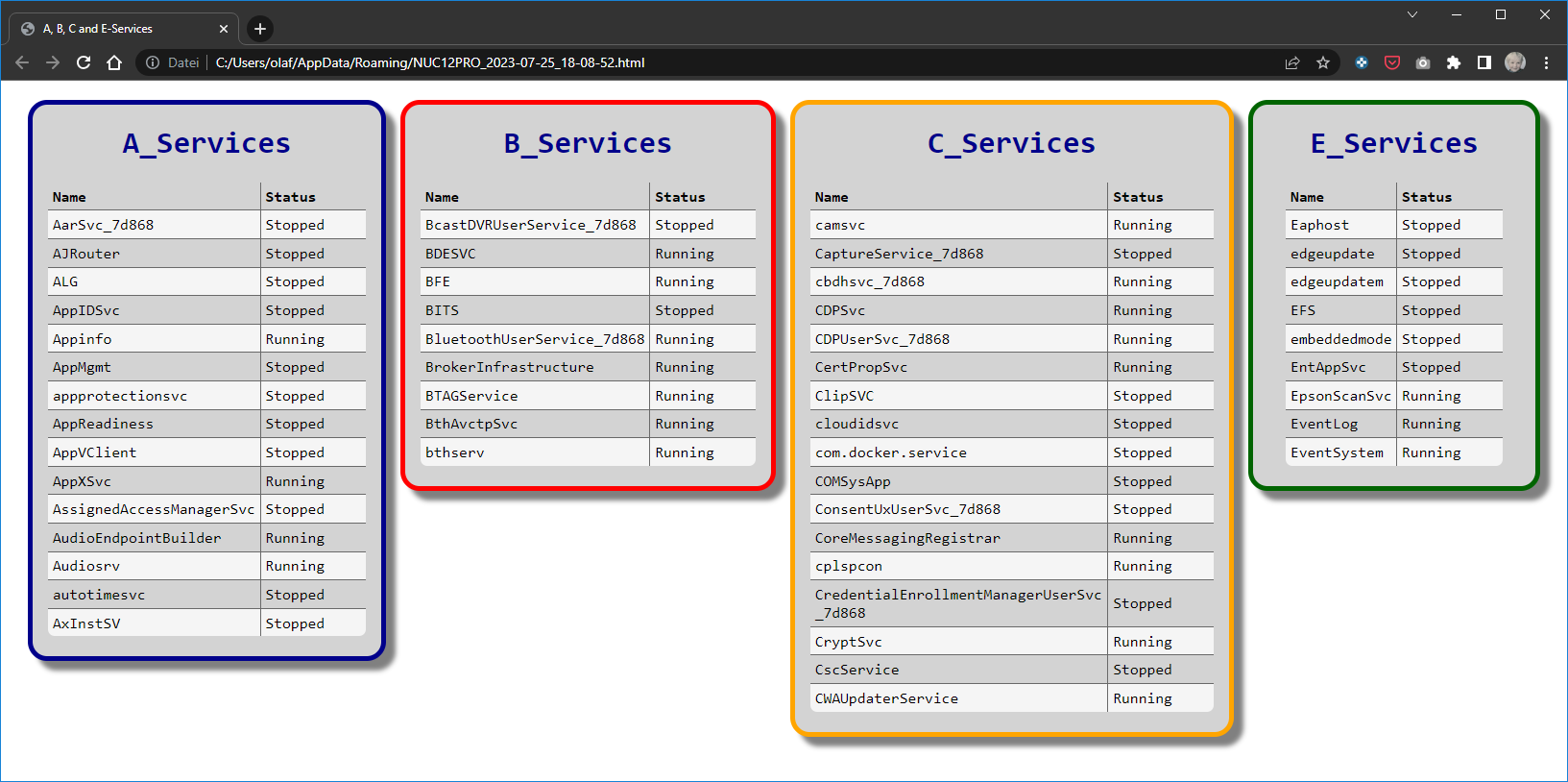
First it will create a CSS file in the output folder.a, b, c and e. Then it creates HTML fragments for each data set and adds the according PRE and POST content. Then it concatenates all fragments to a complete HTML page, links the CSS style sheet file and outputs it to a file in the AppData folder of the currently logged on user. The last action is to invoke this HTML file with the default browser of the system.
As you can see - as long as the browser window is wide enough you get all 4 data sets next to each other. If the browser window width shrinks the individual boxes with the data sets jump to the next line .
dackey
July 25, 2023, 3:13pm
12
Hello Olaf ^^,
Sorry i was seek.
I will try today and tomorrow with your Script
dackey
July 25, 2023, 3:21pm
13
The problem is the same i want to display like this
It’s all the difficulty…
Olaf
July 25, 2023, 4:12pm
14
I really don’t know what you mean. If I run my code suggestion as it is I get this result:
Of course you can tweak the CSS to produce the layout as you like it. But apart from that what’s wrong?
dackey
July 25, 2023, 6:40pm
15
Oh…?? when i run it, i do not have a result like that… i will check tomorrow.
dackey
July 25, 2023, 6:42pm
16
I ve understand, it’s the browser who are to older
I will modify your script for my need
Thx a lot Olaf
Olaf
July 25, 2023, 7:09pm
17
What browser are you using?? … Netscape Navigator?
dackey
July 25, 2023, 7:43pm
18
Lol No, but IE worth !!
Olaf
July 25, 2023, 7:49pm
19
Hasn’t the support for Internet Explorer stopped about a year ago?
dackey
July 25, 2023, 7:52pm
20
Yes i know but i do not have installed Edge at work, so i just have old ie lol.
But i do not think about.


 …
…