Anyway … while testing my code moments ago with all browsers I have I noticed a minor mistake I made in my code “linking” the CSS file to the output HTML. I corrected that in my code suggestion. Now it should even work in IE.
Anyway … while testing my code moments ago with all browsers I have I noticed a minor mistake I made in my code “linking” the CSS file to the output HTML. I corrected that in my code suggestion. Now it should even work in IE.
Finally i’ve modify my script to just create a txt file.
After with your script i do a Get-Content insteed Get-Services.
I’ve not try again, i will put all the code when it’s done !
Finally:
on the Css Array, i would like the Size change automatically with the longueur of the texte in the fill.
I will show you tomorrow i don not haver the script for now.
But it’s nice, with our discution, i hvage change the way to do what i want.
Have a nice Evening.
So what’s i’ve done
First script who create the CSV file, This script is execute on 4 servers, so 4 Csv Files
clear
### Définition des variables ###
$scriptPath = Split-Path -Parent $MyInvocation.MyCommand.Definition

$GX = ((Get-ChildItem "D:\PSTD\Data" | Where{$_.Name -like "G*"}).Name).Split(" ")[0]
$PSTDPath = (Split-Path -Parent $scriptPath) + "\Scripts_$GX"
$GXPath = (Split-Path -Parent $ScriptPath) + "\New-Scripts"
$TabInfosP = @()
$TabInfosMaj = @()

### Récupération des versions des scripts en production ###
$AllScripts = Get-ChildItem $PSTDPath -Filter *.ps1
ForEach($scriptP in $AllScripts)
{
    $file = Get-Content $PSTDPath\$($scriptP.Name)
    ForEach($i in $file)
    {
        If($i -like "*Version..*")
        {
            $Nom = [string]$scriptP
            $Nom = $Nom.split(".")[0]
            $version = $i.Split(" ")[2].replace("V","v")
            $Date = $i.split(" ")[4]
            $TabInfosP +=[pscustomobject]@{
                Nom = $Nom
                Script = $i
                Version = $version
                Date = $Date
            }
        }
    }
}
$Fct = Get-Content -Path ((Split-Path -Parent $scriptPath)  + $fileFonction)
ForEach($f in $Fct)
{
    If($f -like "*Version..*")
    {
        $NomFct= [string]$fileFonction.Split("\")[2]
        $NomFct = $NomFct.Split(".")[0]
        $versionFct= $f.Split(" ")[2].replace("V","v")
        $DateFct= $f.split(" ")[4]
        $TabInfosP +=[pscustomobject]@{
            Nom     = $NomFct
            Version = $versionFct
            Date    = $DateFct
        }

    }
}

### Création du tableau Final et création du CSV ###
$TableFinal = @()
ForEach($SInfos in $TabInfosP)
{
    [string]$Version = $SInfos.version
    Switch($GX)
    {
        GE{$GY="d'Entrée"}
        GB{$GY="Bas"}
        GH{$GY="Haut"}
        GS{$GY="de Sortie"}
    }
    $TableFinal += [PSCustomObject]@{
        Guichet   = $GY
        NomScript = $SInfos.Nom
        Version   = $Version
        Date      = $SInfos.date
    }
}

$TimeStamp = Get-Date -UFormat "%d%m%Y"
$TableFinal | Out-File -FilePath "D:\Check_PSTD\VScriptsPSTD$GY_$TimeStamp"
Second Script, “Your’s”, modify just a bit
@'
.flexbox-container {
    display: flex;
    flex-wrap: wrap;
    justify-content: space-around;
    align-items: flex-start;
    gap: 5px;
    margin: 20px;
}

.flexbox-item {
    color: black;
    font-family: 'Consolas', Courier, monospace;
    font-size: 14px;
    border-style: solid;
    border-width: 5px;
    justify-content: center;
    align-content: center;
    background-color: lightgrey;
    border-radius: 20px;
    box-shadow: 10px 5px 10px  grey;
    padding: 0;
    min-width:  270px;
    max-width: 400px;
    flex-grow: 1;
}

.GE_Scripts {
    border-color: darkblue;
}

.GB_Scripts {
    border-color: red;
}

.GH_Scripts {
    border-color: orange;
    max-width: 900px;
}

.GS_Scripts {
    border-color: darkgreen;
}

h1 {
    color: darkblue;
    text-align: center;
}

table{
    border-spacing: 0;
    border-collapse: collapse;
    border-radius: auto;
    overflow: hidden;
}

table, th, td {
    border-collapse: collapse;
    border: 1px solid dimgrey;
    text-align: left;
    margin: auto;
    margin-bottom: 5px;
    padding: 0.3em;
    word-wrap: break-word;
}

td {
    max-width: 120px;
    min-width: 100px;
}

tr:nth-child(odd) {
    background-color:lightgrey;
}
tr:nth-child(even) {
    background-color:whitesmoke;
}
'@ |
    Out-File -FilePath (Join-Path -Path $Env:APPDATA -ChildPath 'style.css')

$TimeStamp = Get-Date -UFormat "%m%Y"
$outFile = Join-Path -Path $Env:APPDATA -ChildPath ($ENV:COMPUTERNAME + '_'+ $TimeStamp + '.html')

$GE_Scripts_PreContent = @'
<div class="flexbox-item A_Services">
    <h1>GE Scripts</h1>
    <p>
'@

$GB_Scripts_PreContent = @'
<div class="flexbox-item B_Services">
    <h1>GB Scripts</h1>
    <p>
'@

$GH_Scripts_PreContent = @'
<div class="flexbox-item C_Services">
    <h1>GH Scripts</h1>
    <p>
'@

$GS_Scripts_PreContent = @'
<div class="flexbox-item E_Services">
    <h1>GS Scripts</h1>
    <p>
'@

$PostContent = @'
    </p>
</div>
'@

$GE_Scripts = Import-Csv -Path "D:\Check_PSTD\VScriptsPSTDGE-$TimeStamp.csv" -Delimiter "," -Encoding UTF8
$GB_Scripts = Import-Csv -Path "D:\Check_PSTD\VScriptsPSTDGB-$TimeStamp.csv" -Delimiter "," -Encoding UTF8
$GH_Scripts = Import-Csv -Path "D:\Check_PSTD\VScriptsPSTDGH-$TimeStamp.csv" -Delimiter "," -Encoding UTF8
$GS_Scripts = Import-Csv -Path "D:\Check_PSTD\VScriptsPSTDGS-$TimeStamp.csv" -Delimiter "," -Encoding UTF8


$GE_Scripts_HTML =
$GE_Scripts |
Select-Object -Property NomScript, Version, Date |
ConvertTo-Html  -As Table -Fragment -PreContent $GE_Scripts_PreContent -PostContent $PostContent
$GB_Scripts_HTML =
$GB_Scripts |
Select-Object -Property NomScript, Version, Date |
ConvertTo-Html  -As Table -Fragment -PreContent $GB_Scripts_PreContent -PostContent $PostContent

$GH_Scripts_HTML =
$GH_Scripts |
Select-Object -Property NomScript, Version, Date |
ConvertTo-Html  -As Table -Fragment -PreContent $GH_Scripts_PreContent -PostContent $PostContent
$GS_Scripts_HTML =
$GS_Scripts |
Select-Object -Property NomScript, Version, Date |
ConvertTo-Html  -As Table -Fragment -PreContent $GS_Scripts_PreContent -PostContent $PostContent

$ConvertToThmlParams = @{
    Body        = "<div class=""flexbox-container""> $GE_Scripts_HTML $GB_Scripts_HTML $GH_Scripts_HTML $GS_Scripts_HTML </div>"
    Title       = 'GE, GB, GH and GS-Scripts'
    CssUri      = 'style.css'
}

ConvertTo-Html @ConvertToThmlParams |
    Out-File -FilePath $outFile
Invoke-Item -Path $outFileype
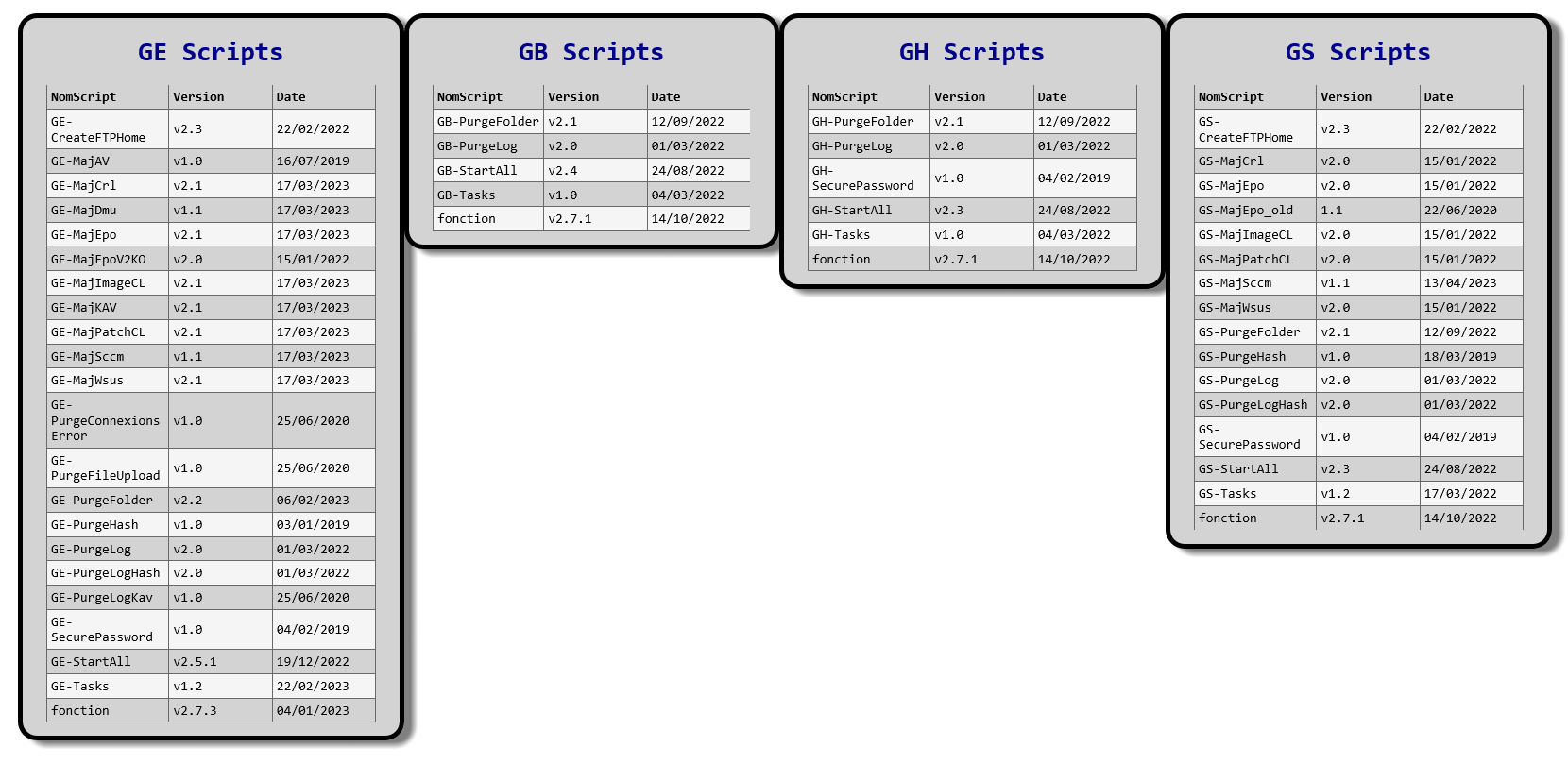
Résult
I’m a noob too in CSS … 
I do not understand why the color are not set ?
I’ve used Edge and it’s the same result.
What i would like to do now, is to have a Column size auto for the “Version”, i loose too many place.
Is it possible ?
For the border color it’s ok ^^
me too. 
I’ve done a mix between my first CSS and your’s
@'
.flexbox-container {
    display: flex;
    flex-wrap: wrap;
    justify-content: space-around;
    align-items: flex-start;
    gap: 5px;
    margin: 5px;
}
    h1, h5, th {text-align: center;}
    table { margin: 10px auto auto auto; font-family: Segoe UI; box-shadow: 10px 10px 5px #888; border: thin ridge grey; }
    th { background: #0046c3; color: #fff; max-width: 400px; padding: 5px 10px; }
    td { font-size : 12px; padding: 5px 20px; color: #000; }
    tr { background: #b8d1f3; }
    tr:nth-child(even) { background: #dae5f4; }
    tr:nth-child(odd) { background: #b8d1f3; }


.flexbox-item {
    color: black;
    font-family: 'Consolas', Courier, monospace;
    font-size: 14px;
    table-layout: auto;
    border-style: solid;
    border-width: 5px;
    justify-content: center;
    align-content: center;
    background-color: lightgrey;
    border-radius: 20px;
    box-shadow: 2px 2px 2px  grey;
    margin: 5px;
    padding: auto;
    padding-right: 0;
    min-width:  270px;
    max-width: 400px;
    flex-grow: 1;
}

.GE_Scripts {
    border-color: darkblue;
}

.GB_Scripts {
    border-color: red;
}

.GH_Scripts {
    border-color: orange;
    max-width: 900px;
}

.GS_Scripts {
    border-color: darkgreen;
}

'@ |
    Out-File -FilePath (Join-Path -Path $Env:APPDATA -ChildPath 'style.css')

$TimeStamp = Get-Date -UFormat "%m%Y"
$outFile = Join-Path -Path $Env:APPDATA -ChildPath ($ENV:COMPUTERNAME + '_'+ $TimeStamp + '.html')

$GE_Scripts_PreContent = @'
<div class="flexbox-item GE_Scripts">
    <h1>GE Scripts</h1>
    <p>
'@

$GB_Scripts_PreContent = @'
<div class="flexbox-item GB_Scripts">
    <h1>GB Scripts</h1>
    <p>
'@

$GH_Scripts_PreContent = @'
<div class="flexbox-item GH_Scripts">
    <h1>GH Scripts</h1>
    <p>
'@

$GS_Scripts_PreContent = @'
<div class="flexbox-item GS_Scripts">
    <h1>GS Scripts</h1>
    <p>
'@

$PostContent = @'
    </p>
</div>
'@

$GE_Scripts = Import-Csv -Path "D:\Check_PSTD\VScriptsPSTDGE-$TimeStamp.csv" -Delimiter "," -Encoding UTF8
$GB_Scripts = Import-Csv -Path "D:\Check_PSTD\VScriptsPSTDGB-$TimeStamp.csv" -Delimiter "," -Encoding UTF8
$GH_Scripts = Import-Csv -Path "D:\Check_PSTD\VScriptsPSTDGH-$TimeStamp.csv" -Delimiter "," -Encoding UTF8
$GS_Scripts = Import-Csv -Path "D:\Check_PSTD\VScriptsPSTDGS-$TimeStamp.csv" -Delimiter "," -Encoding UTF8


$GE_Scripts_HTML =
$GE_Scripts |
Select-Object -Property NomScript, Version, Date |
ConvertTo-Html  -As Table -Fragment -PreContent $GE_Scripts_PreContent -PostContent $PostContent
$GB_Scripts_HTML =
$GB_Scripts |
Select-Object -Property NomScript, Version, Date |
ConvertTo-Html  -As Table -Fragment -PreContent $GB_Scripts_PreContent -PostContent $PostContent

$GH_Scripts_HTML =
$GH_Scripts |
Select-Object -Property NomScript, Version, Date |
ConvertTo-Html  -As Table -Fragment -PreContent $GH_Scripts_PreContent -PostContent $PostContent
$GS_Scripts_HTML =
$GS_Scripts |
Select-Object -Property NomScript, Version, Date |
ConvertTo-Html  -As Table -Fragment -PreContent $GS_Scripts_PreContent -PostContent $PostContent

$ConvertToThmlParams = @{
    Body        = "<div class=""flexbox-container""> $GE_Scripts_HTML $GB_Scripts_HTML $GH_Scripts_HTML $GS_Scripts_HTML </div>"
    Title       = 'GE, GB, GH and GS-Scripts'
    CssUri      = 'style.css'
}

ConvertTo-Html @ConvertToThmlParams |
    Out-File -FilePath $outFile
Invoke-Item -Path $outFile
Result
Cool. … looks like you’re becomming an expert in CSS … 
 Oh no…but i’ve learn about CSS.
Thanks Olaf and Other guys for help ^^
Have a nice Day