I was practicing my powershell skill with writing a any function(similar to Linq.Any), it should look like Where-Object(1,2,3 | any { $_ -gt 1 }). But I have two problems:
How to pass $PSItem to the scriptblock parameter? it doesn’t seem to share the context
How to break early in process block, since it’s any not all
function any {
    param (
        [Parameter(ValueFromPipeline)]
        [psobject]$InputObject,
        [Parameter(Position = 1, Mandatory)]
        [scriptblock]$Condition
    )
    begin {
        $ret = $false
    }

    process {
        if (& $Condition) { # how to pass $_ to $Condition?
            $ret = $true
            return  # how to early break process block? return seems only skip current iteration
        }
    }

    end {
        $ret
    }
}
Your first question is null and void, as you are already piping in the value via your InputObject parameter.
For your second question, since you’re processing pipeline input, the process block will only have one item at a time. If you don’t want to continue processing the remaining items (you’ve found your first $true condition) then you’ll need to break out. Once you do that, the pipeline is stopped. I would not try to capture the $true and simply output it once found then break out. We’ll add a $false to the end block so that if none of the piped in items match the criteria it will spit out $false in the end.
function any {
    param (
        [Parameter(ValueFromPipeline)]
        [PSObject]$InputObject,
        [Parameter(Position = 1, Mandatory)]
        [scriptblock]$Condition
    )
    begin {
        $ret = $false
    }

    process {
        Write-Verbose "processing $_"
        if (& $Condition) { # how to pass $_ to $Condition?
            $true
            break
        }
    }

    end {
        $false
    }
}

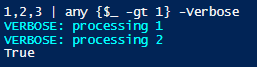
1,2,3 | any {$_ -gt 1} -Verbose
Adding the verbose flag to see the items as they go through, you’ll see this output
However, I would also recommend you type constrain the $InputObject. As written, you can pass in a letter which would also be greater.
1,'b',2,3 | any {$_ -gt 3} -Verbose
If we constrain to [int] then only numbers will be evaluated
function any {
    param (
        [Parameter(ValueFromPipeline)]
        [int]$InputObject,
        [Parameter(Position = 1, Mandatory)]
        [scriptblock]$Condition
    )
    begin {
        $ret = $false
    }

    process {
        Write-Verbose "processing $_"
        if (& $Condition) { # how to pass $_ to $Condition?
            $true
            break
        }
    }

    end {
        $false
    }
}

1,'b',2,3 | any {$_ -gt 2} -Verbose
Hi, thanks for replying, I just found that I can’t reproduce your example in powershell core 7.5.2 when the function is defined in my profile(I organized my profile as a module, so the function came from the module). if(& $Condition) is never triggered as if it didn’t know the context of $_ which is why I asked the first question. Directly defining it on the session works, I think there might be a scoping problem.