Trimming an Azure AD powershell runbook to fit within the 400MB limit

I’m not sure if this is the right forum for this since this is not exclusively Powershell but also AAD, but I thought I’d give it a go.

I have a runbook in Azure AD which is supposed to grab the active licensed users in the AD and export a number of CSVs to an Azure AD blob storage.

However, the runbook now consistently ends up in the suspended state with the exception:
The runbook job failed due to sandbox running out of memory. Each Azure Automation sandbox is allocated 400 MB of memory. The job was attempted 3 times before it was suspended. See some common ways to resolve this at https://aka.ms/AAMemoryLimit

The query which seems to be the problem is the following:

#Report for Active Users
Write-Output 'Getting all active non-student users'
$Export = Get-MgUser -All -Filter 'accountEnabled eq true' |
  Where-Object '$_.UserPrincipalName -match "[NON STUDENT DOMAIN]"' |
  Select-Object -Property DisplayName,UserPrincipalName,onPremisesSamAccountName,@{n="License";e={$_.assignedLicenses.skuId}},Department, CompanyName, accountEnabled,UserType
Write-Output $Export.Count
Write-Output 'Got all active non-student users'

Looking at the Output tab for the suspended jobs I find the following:

Environments                                                                                                            
------------                                                                                                            
{[AzureChinaCloud, AzureChinaCloud], [AzureCloud, AzureCloud], [AzureGermanCloud, AzureGermanCloud], [AzureUSGovernme...

Connected to Azure

Welcome To Microsoft Graph!

Getting all active non-student users


Environments                                                                                                            
------------                                                                                                            
{[AzureChinaCloud, AzureChinaCloud], [AzureCloud, AzureCloud], [AzureGermanCloud, AzureGermanCloud], [AzureUSGovernme...

Connected to Azure

Welcome To Microsoft Graph!

Getting all active non-student users


Environments                                                                                                            
------------                                                                                                            
{[AzureChinaCloud, AzureChinaCloud], [AzureCloud, AzureCloud], [AzureGermanCloud, AzureGermanCloud], [AzureUSGovernme...

Connected to Azure

Welcome To Microsoft Graph!

Getting all active non-student users

So it seems that the query somehow fails or times out and then retries three times before being put in the suspended state.

I have run the same query directly from a Powershell prompt and it’s not exactly fast but it works.

I have a similar runbook for inactive users which was previously integrated directly into this runbook and it works without a hitch. Naturally the number of inactive users is miniscule compared to the number of active users.

I’ve already modified the initial query a number of times from this (+12k users in two separate variables):

$Result = Get-MgUser -All -Filter 'accountEnabled eq true'
$Export = $Result | select DisplayName,UserPrincipalName,onPremisesSamAccountName,@{n="License";e={$_.assignedLicenses.skuId}},Department, CompanyName, accountEnabled,UserType

Through (+12k users in one variable):

$Export = Get-MgUser -All -Filter 'accountEnabled eq true' | 
	Select-Object DisplayName,UserPrincipalName,onPremisesSamAccountName,@{n="License";e={$_.assignedLicenses.skuId}},Department, CompanyName, accountEnabled,UserType

To the one listed above (+4k users in one variable):

$Export = Get-MgUser -All -Filter 'accountEnabled eq true' |
  Where-Object '$_.UserPrincipalName -match "[NON STUDENT DOMAIN]"' |
  Select-Object -Property DisplayName,UserPrincipalName,onPremisesSamAccountName,@{n="License";e={$_.assignedLicenses.skuId}},Department, CompanyName, accountEnabled,UserType

Nonetheless the script is still suspended before moving onto the CSV exports.

What baffles me is that it has run successfully previously, but for some reason it consistently fails now.
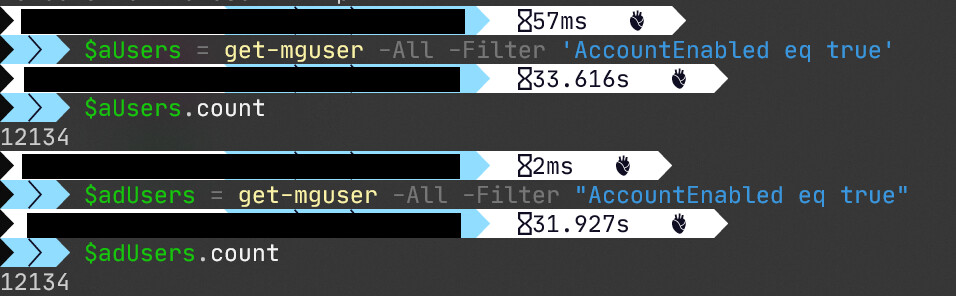
One obvious mistake I see right away is that you fail to expand variable…

This is wrong:

Where-Object '$_.UserPrincipalName -match "[NON STUDENT DOMAIN]"'

should be:

Where-Object "$($_.UserPrincipalName) -match '[NON STUDENT DOMAIN]'"

Take care not to use single quotes unless strictly necessary, use double quotes where ever possible, and convert to single quotes only when string doesn’t work.

Mea Culpa. That should of course be:

Where-Object -FilterScript {$_.UserPrincipalName -match "[NON STUDENT DOMAIN]"}

Messed it up in the script when jumping back and forth between the MgGraph/Azure AD formatting of the -Filter parameter using quotations and the classic version with the braces/curly brackets.

Double checked and I did use the correct formatting when I ran this directly from Powershell.

I’ve updated the runbook and I’m trying it again.
Unfortunately that doesn’t seem to be the problem.
I’m already seeing that it’s on the second attempt and I’m not getting the response from the two Write-Outputs following the Get-MgUser statement.

That wasn’t it unfortunately… As before it made three attempts at grabbing the users before suspending the job and returning the Sandbox running out of memory exception.

I’m wondering if it’s a combination of timeout and memory issues.
It takes a while to run the Get-MgUser cmdlet, and adding the Where-Object filter adds to that. So if it starts to add information to the $Export variable that will of course consume memory and I’m guessing that’s not released properly when the first attempt fails so on the second and third retries that will just add to the memory being consumed by the runbook.

does it work if you exclude Select-Object portion? ex:

$Export = Get-MgUser -All -Filter 'accountEnabled eq true' |
       Where-Object "$($_.UserPrincipalName) -match '[NON STUDENT DOMAIN]'"

I see another mistake, this should be:

$Export = Get-MgUser -All -Filter "accountEnabled eq True" |
       Where-Object -Property UserPrincipalName -Match "[NON STUDENT DOMAIN]"

Do you have to assign the data to the variable? Can you not just pipe straight to Export-Csv?

@metablaster
The Get-MgUser cmdlet has been running with single quotes the entire time and worked… I’m running it again with double quotes


Also verified directly in Powershell that there’s no difference in results using single or double quotes.

@matt-bloomfield
Unfortunately There are a number of SKUs that are exported to separate CSVs.

I’ve already moved a large part of this to a separate runbook, using basically the same contents as this, but with a lot fewer users in total. And that runbook works like a charm.

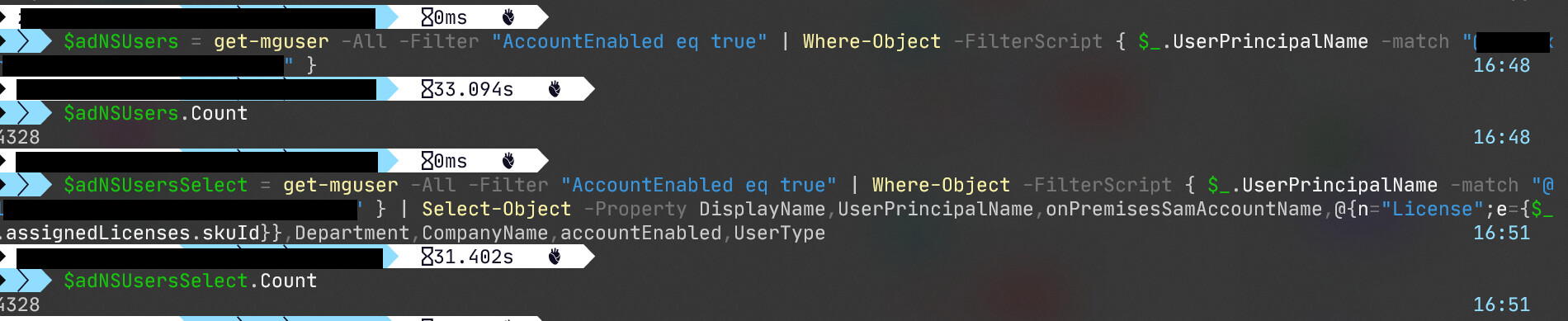
Running all of the various cmdlets in Windows Terminal shows that it takes ~30 seconds to run each:


And should give me a little more than 4.3k users. The 4 is somewhat cut off in the screen dump, but it’s there.
It seems to me that neither the time nor the amount of users/consumed memory should be a problem for a runbook.

Therefore problem is with your Select-Object or Where-Object portion!

Select-Object and Where-Object is slow, consider using foreach instead.

Does Where-Object work?

@metablaster
I’m not sure I understand you.
I just verified that all three versions of the Get-MgUser cmdlet works and returns the expected number of results:

  • Get-MgUser alone filtering for active users - returns ~12k users
  • Get-MgUser piped to Where-Object selecting only non-student users - returns ~4k users
  • Get-MgUser piped to Where-Object which in turn is piped to Select-Object which justs grabs specific info needed for the final output CSVs - returns the same ~4k users as above, but with specific information.

As I mentioned each of these runs take about 30 seconds each… It’s not blazing fast, but I feel it’s perfectly reasonable for grabbing an inital 12k results from the cloud service and then manipulating these results slightly.

If you mean that the results seem off to you, they’re not really. We have a number of schools in the district and the students are in the same tenant, but they have a unique domain name. So going from all active users (~12k) to all active non-student users (~4.3k) is not unreasonable.

I know this was posted a long time ago, but I have some experience in this. It looks like your runbook is restarting (I have had this issue in the past), it can do this if you are allowing objects into the output, (again no idea why) but it can cause the runbook to restart (there is no obvious reason for it to do this). Try keeping everything inside variables and putting very little to the output.

I would also split your commands up, i.e. have your get command just into a variable, then do a select on that variable.
Runbooks are strange beasts and its not mentioned in the documentation but if a command sits for too long and azure is not getting any response from the PowerShell terminal in the sandbox I suspect it restarts it - this is just coming from my experience from using them for SharePoint and teams creation/modification

Thank you.
I may try to rewrite the script without piping and see if that works.

I probably should have reported back here, but with a bit of, shall we say, out-of-the-box hacking I managed to get it to work.

Basically I for-eached through all mailboxes starting with “a”, then “b” all through the rest of the alphabet.
That made each chunk small enough that no separate command timed out.

No problem, glad to hear you have something that is working :slight_smile: