I am using the amazingly useful PSZoom module from Joseph McEvoy https://github.com/JosephMcEvoy/PSZoom
Many many thanks to him for wrapping the Zoom API for use in powershell.
However, I think I messed something up when trying to use it.
Intent:
To download, on a regular basis, all the recorded classes for my school (I am in IT at the school) and place them into named folders, then delete them from zoom if I so choose.
Process:
The script looks for all paid accounts (I dont want student recordings, if there are any). Then looks for recordings for those accounts. It uses the UUID of the meetings on those recordings to get the download url for the meeting, which then allows the download of the recording.
It seems backwards, but the get-zoomrecordings function does not seem to have a download url return option, just a share/view which is not the same.
Then I use webclient to download everything.
Choices:
I chose to use CSV files for the information instead of processing everything in powershell directly because I wanted the ability to trace what is going on after the fact, as well as the option to comment out the existing variables and the portion that writes to them and simple define what $fromfile1 has in it.
Specific Issue:
Zoom shows that I have 68 meetings with recordings, but my script only sees 4 items to download, and then only offers to download two of them.
Worse, there are no errors shown that would in any way explain this. I get errors for those meetings that are not done processing, but that’s expected. Everything else… either gets ignored or something… I have clearly done something wrong, and your help is greatly appreciated.
#pre-reqs, PSZoom powershell module, an admin account on zoom, your oauth set and your JWT Auth set.
#update this to match your environment - you will need a JWT token, and they expire regularly, https://marketplace.zoom.us/develop/apps/[APPID]/feature
#you will need your from and to dates, your download location,
#and to choose if you want auto delete (change no to yes AND uncomment the remove section on line 38
import-module PSZoom
$Global:ZoomApiKey    = 'REDACTED FOR SAFETY'
$Global:ZoomApiSecret = 'REDACTED FOR SAFETY'
$base = "C:\working\Testing\"
$fromfile1 = "C:\working\zoomusers_$((Get-Date).ToString('MM-dd-yyyy')).csv"
$fromfile2 = "c:\working\rcdngs_$((Get-Date).ToString('MM-dd-yyyy')).csv"
$fromfile3 = "c:\working\DWNLD_$((Get-Date).ToString('MM-dd-yyyy')).csv"
$downlog = "c:\working\ZoomDownloads_$((Get-Date).ToString('MM-dd-yyyy')).log"
$deletelog = "c:\working\ZoomDelete_$((Get-Date).ToString('MM-dd-yyyy')).log"
$exportPath = 'c:\working\files\'
$jwt='REDACTED FOR SAFETY'
$AToken='/?access_token='
$autodelete= 'NO'
$count=0
$FDATE="2021-11-11"
$TDATE="2022-02-28"

Get-ZoomUsers -AllPages -status active | Where-Object {$_.type -eq "2"} |Select-Object id,first_name,last_name,email,pmi | export-csv $fromfile1 -NoTypeInformation
write-host "obtained users"
$Users = Import-Csv -Path $FromFile1
Write-Host "getting recording list"
foreach ($user in $Users) {
Get-zoomRecordings -userId $user.email -From $FDATE -PageSize 300 -To $TDATE |Select-Object -ExpandProperty meetings| export-csv -append $fromfile2 -NoTypeInformation
$MIDS = Import-Csv -Path $fromfile2
foreach ($MID in $MIDS) {
Get-ZoomMeetingRecordings -MeetingId $MID.uuid | Select-Object -property topic,start_time -ExpandProperty recording_files| Select-Object -property topic,start_time,meeting_id,download_url| export-csv $fromfile3 -Append -NoTypeInformation
$count=$count+1
}
}
write-host "got recording list, $count items long"
Write-Host "converting to download links, and begining downloads"
$Links = Import-Csv -Path $fromfile3
foreach ($Link in $Links) {
$MTD = $Link.start_time.substring(0,10)
$path = ($base + $Link.topic)
If(!(test-path $path))
{
      New-Item -ItemType Directory -Force -Path $path
}
$uri= ($link.download_url + $AToken + $jwt)
$inc = 1
$file=($path + "\" + $mtd + "-" + $inc + ".mp4")
If(!(test-path $file)) {
$wc=New-Object System.Net.WebClient
$wc.DownloadFile($uri,$file)
Write-Output "downloading $file" | out-file $downlog -append}
else {
$items=(Get-ChildItem $path | Measure-Object).Count
$inc=$inc+$items
$file=($path + "\" + $mtd + "-" + $inc + ".mp4")
$wc=New-Object System.Net.WebClient
$wc.DownloadFile($uri,$file)
Write-Output "downloading $file" | out-file $downlog -append}

if($autodelete -eq 'YES'){
    #Remove-ZoomMeetingRecordings -MeetingId $link.meeting_id -Action delete
    Write-Output ($link.topic + " on " + $MTD + " was succesfully delted on $((Get-Date).ToString('MM-dd-yyyy_hh-mm-ss'))") | out-file $deletelog -append
    }
}

 With using CSV files as intermediate data store you limit yourself to a few properties transfered by strings. Therefore most of them no longer have their original data type.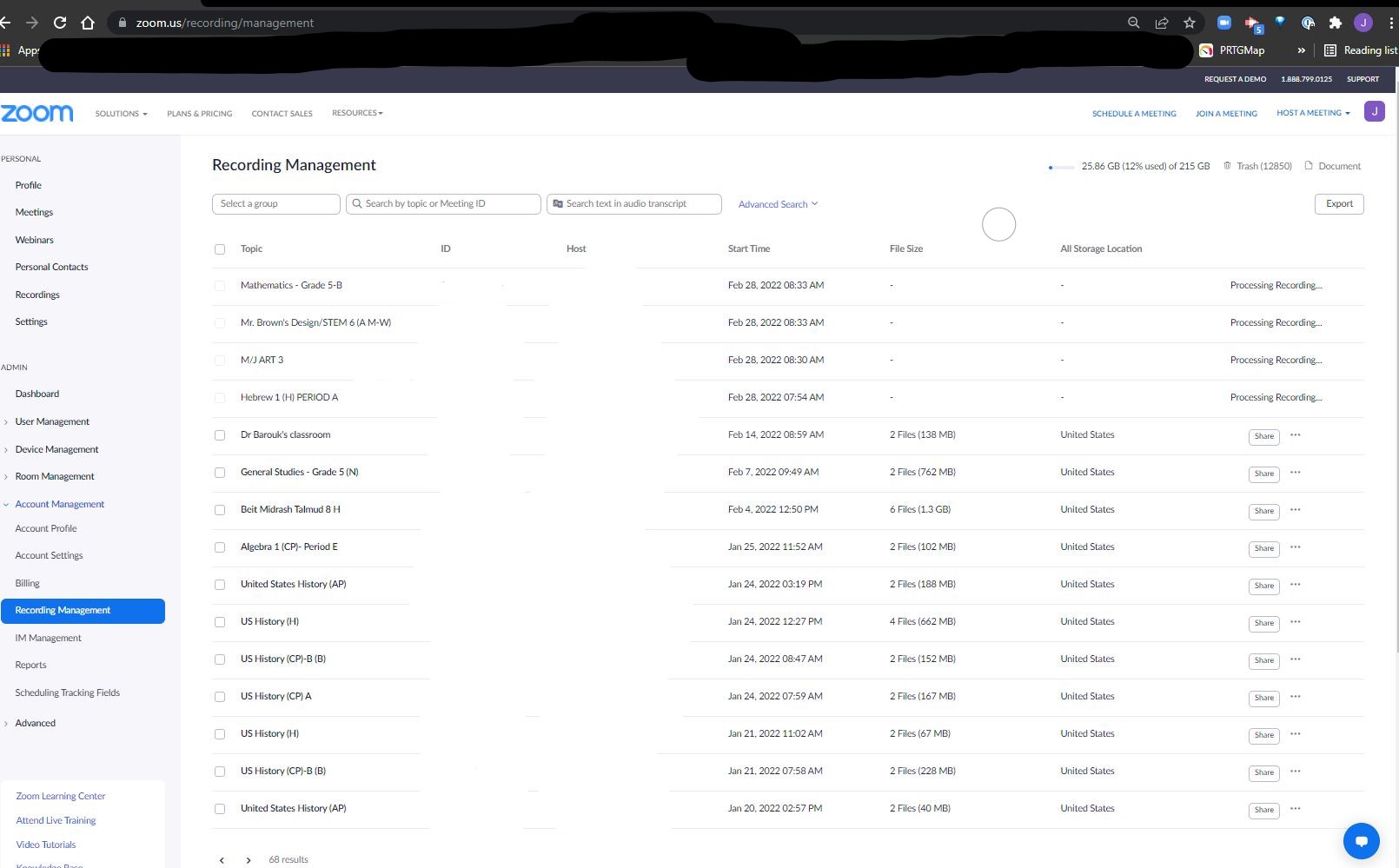


 Now you are the expert.