Dicey provided a function definition. If all you did is run it, then of course nothing happened. Functions must be called to execute. Did you call the function? If so, can you post the function call? i.e.
I ran it like your example and received:
The script failed due to call depth overflow.
+ CategoryInfo : InvalidOperation: (0:Int32) , ParentContainsErrorRecordException
+ FullyQualifiedErrorId : CallDepthOverflow
If I run like this:
-Keywords (“528319970”,“200107”)
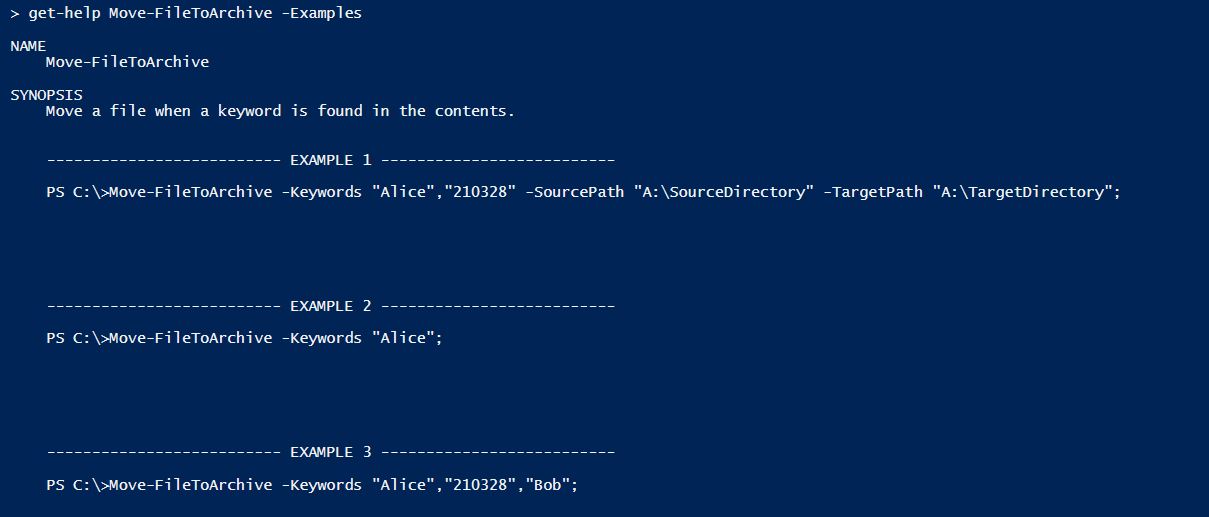
The Keywords param is typed as an array. Look at the examples provided in the function’s front matter as to how to declare its members. Be sure to also replace the Source and Target paths in the function’s Begin{} section with your own defaults. For reasons I won’t detail here, this is how I provide some types of parameter defaults.
Delete HelpUri = "Keywords should include: Sender, FileDate, or RecordType", and your users will be able to get this info using Get-Help Move-FileToArchive -Examples
–I had included HelpUri to show where it could be used, and its limitations. It is a great feature when you have documentation stored online that describes a process; it’s practices (e.g., examples), the standards, or a foundational policy.
I’m making two hotfixes to the function because they are integral to an implied successful execution; but I’m stopping my code review after these.
Hotfixes
foreach($file in Get-ChildItem -Path $SourcePath -Depth 1 -Filter "*.bak")
: adds Depth parameter and sets it to 1.
Move-Item -Path $searchFile -Destination $TargetPath;
: removes the return which caused a termination of the function on the first match instance. Additional files in the directory were not reached.
You are not helping us help you. You don’t show how you run it. I consider this post as “unable to be helped” currently as you just plain aren’t providing required details.
Create two file directories and put a few files into one and test the function using those items. By using test locations and files, you can narrow down on whether it’s code or something behind the code. Then… google away. Get comfortable with VS Code and stepping into code with it’s PowerShell debugger.
For example, if the production directories you are using (yipes?) generate the raised error when hitting Get-ChildItem, then something in the code may need to be altered to accommodate their particular state. Debugging it can pinpoint where the issue happens.
I think your learning process would start by formatting your code as code here in the forum.
It is not possible to learn a complex technology like a scripting language or a programming language by guessing or by piecing together some arbitrary snippets of code someone else provided you in a forum. And we cannot teach you how to write functional and working code. It does not make any sense when you don’t understand the help you get.
I’d recommend for you to make some big steps back and restart with learning the very basics of PowerShell first. You have actually got all information you need to solve your initially asked question.
###########################################################

$Path = "C:\ftp_in"
$Searcharry = @("809430399","pr")
$PathArray = @()
$Results = "C:\temp\test.txt"


# This code snippet gets all the files in $Path that end in ".???".
Get-ChildItem $Path -Filter "*.int" |
Where-Object { $_.Attributes -ne "Directory"} |
ForEach-Object {
If (Get-Content $_.FullName | Select-String -Pattern $Searcharry) {
$PathArray += $_.FullName
}
}
Write-Host "Contents of ArrayPath:"
$PathArray | ForEach-Object {$_}

$PathArray | % {$_} | Out-File $Results


##########################################################
This seems to find my searcharry, but how can add the searcharry as parms? not hard coded
I also need it to search an entire folder structure, so I’m going to add -recurse, but I don’t want it
to stop on first hit.
Thanks
does my code excluding parms look like it should work. I have tested on a small sample set and seems to
work, but would like a more savy PS coder to review for correctness.
You know that you can provide a file directly to Select-String, don’t you? You should start reading the help for the cmdlets you’re about to use. Read it completely including the examples, please.
If it works for you at the moment it’s just fine. I’d recommend when your skill increases over time you should review your old code from time to time and try to make it better / cleaner / faster / more reliable / fault-tolerant or even just a little easier to read and pleasing for the eyes.
And instead of asking others again and again to review your seemingly working code you could search the internet for code from others for similar tasks and let yourself inspire by some of it. StackOverflow usually is good source of inspiration for PowerShell coders.
So how is the Code Dicey created different from the code I supplied in there functionality? I didn’t have to adds Depth parameter and sets it to 1. Trying to understand how original code didn’t find matches.

 Try to remember how you figured that out and continue to do so.