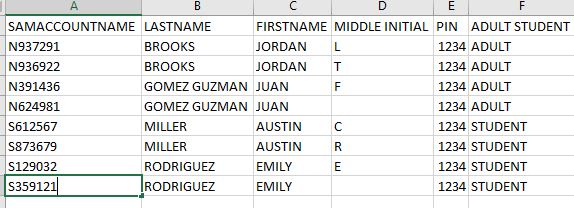
Good afternoon everyone! I hope this finds everyone well during this pandemic. I have been tasked with creating a new user automation script. I know what needs to be done but do not understand fully how to implement it into my script. I have a CSV with thousands of users which of course some have the same firstname and lastname, which is what is causing my problem. I know I need to add number at the end of the name to make this unique, but do not know how to accomplish this to not only add a number at the end but also check if the name is in use and if it is increment it up to 2, 3 and so on. Below is a screenshot of my csv and below that my script. Any help would be greatly appreciate it.
# Import active directory module for running AD cmdlets
Import-Module activedirectory

#Store the data from ADUsers.csv in the $ADUsers variable
$ADUsers = Import-csv C:\Temp\duplicates.csv

#Loop through each row containing user details in the CSV file
foreach ($User in $ADUsers)
{
#Read user data from each field in each row and assign the data to a variable as below

$Username = $User.SamAccountName
$Password = $User.pin
$Firstname = $User.firstname
$Lastname = $User.lastname
$DisplayName= "$LastName $FirstName"
#$Name = $FirstName.Substring(0,1)+$LastName
#$Description= $user.$Description
$OU_Adult = "OU=S_Adult,OU=Enrolled Students,DC=testlab,DC=local".Path #This field refers to the OU the user account is to be created in
$OU_Student = "OU=N_Student,OU=Enrolled Students,DC=testlab,DC=local"
#$email = $User.email
#$streetaddress = $User.streetaddress
#$city = $User.city
#$zipcode = $User.zipcode
#$state = "FL"
#$country = $User.country
#$telephone = $User.telephone
#$jobtitle = "Staff"
#$company = $User.company
#$department = $User.company

#Check if SamAccountName Starts with S or N
if ($Username -like 'S*')
{
$OU = "OU=S_Adult,OU=Enrolled Students,DC=testlab,DC=local"
}
if ($Username -like 'N*')
{
$OU = "OU=N_Student,OU=Enrolled Students,DC=testlab,DC=local"
}

#Check to see if the user already exists in AD
if (Get-ADUser -F {SamAccountName -eq $Username})
{
#If user does exist, give a warning
Write-Log -Message "A user account with username $Username already exist in Active Directory." -Level info -Path $Path
}
else
{
#User does not exist then proceed to create the new user account

#Account will be created in the OU provided by the $OU variable read from the CSV file
$NewUserParams = @{
#'SamAccountName' = $Username
'UserPrincipalName' = "$Username@testlab.local"
'Name' = $Name
'GivenName' = "$Firstname"
'Surname' = "$Lastname"
'Enabled' = $True
'DisplayName' = "$DisplayName"
#'Description' = $Description
'Path' = $OU
#-Company $company
#'State' = $state
#'Title' = $jobtitle
#'Department' = $department
'AccountPassword' = (convertto-securestring $Password -AsPlainText -Force)
}
New-AdUser @NewUserParams
}
}