Afternoon all,
Been trying all day to accomplish filling Data.DataTable row/column cell with values and decided to give up and ask for help. What I’m attempting to do with the script below is to read a .csv file containing the list of my servers and create a table in where col1 contains my server name (done working), col2 the service name and col3 the service status. What I’m having a mental block with is how to address row.col1 and row.col2 fields and fill with appropriate values.
Your help greatly appreciated
$RowCount = 1
Foreach ($Row in $CVSData) {
$arrService = Get-Service -Name $ServiceName
[void]$DataTable.Rows.Add($Row.split(‘,’))
$DataTable.Rows.($RowCount).Item(‘Service’) = $arrService
$DataTable.Rows.($RowCount).Item(‘Status’) = $arrService.status
$RowCount ++
}
Hello and welcome. Can you please edit your post and use the “Preformatted Text” button to format your code so that it looks more like this:
Get-Service -Name $ServiceName
Also, your call to Get-Service doesn’t specify a ComputerName so presumably it would just return that service from the computer you’re running this code from.
Can you also provide a little sample of your CSV data? Is it really just a single column of server names with no header row?
Thank you for the reply. Cannot believe I forgot to enter the -ComputerName parameter…good catch and thank you.
I’ll need to figure out which window to post the code in to have it properly format (when I edit my post two windows are presented each with my original post).
But meantime, my csv inut file has a header row with labels for the 3 columns I need in the output table ‘servername’, ‘servicename’ and ‘service status’
then the rest are the server names comma separated
Please forgive the ignorance on how to post properly formatted code; Below is all the information on what I’ve created so far. Thank you to greyOut for noticing the missing parameters. I need help with two items: 1) the call to Get-Service is not liking the contents of $Sever and returns that the field is empty. 2) Still unable to address individual cells in the table to enter the service Name and the service Status
--------------------------- CSV File contents --------------------------
Server,Service,SvcStatus
Server1,
Server2,
Server3,
------------------------------PS SCript ---------------------------------
#Declare the table
$DataTable = New-Object Data.DataTable
$DateTime = (Get-Date).ToString("yyyy/MM/dd-hh:mm")
$Message1 = " Server being queried: "
$ServiceName = 'CohesityAgent'
$OutDataFile = "D:\SQL\Reports\Backups\CohesityAgentData.txt"

# Fill CSVData from the CSV file
$CSVData = Get-Content -Path "D:\SQL\Reports\Server_List.csv"
#Extract the Header row of the CSV inport as the columns
$Columns = $CSVData[0].split(',')

#Re-Index CSVData to remove the Header Row
$CSVData = $CSVData | select -skip 1

# Add the column names on top table row
$DataTable.Columns.AddRange($Columns)

# Need a numerical counter for addressing the cells in each rows????
$RowCount = 1
#Loop and build the table rows
Foreach ($Row in $CSVData) {
  $Server = $Row.split(',')  -replace "\W"
  $arrService = Get-Service -ComputerName $Server -Name $ServiceName
  [Void]$DataTable.Rows.Add($Row.split(','))
  #$DataTable.Rows[$RowCount].setField("Service", $arrService.Name)
  #$DataTable.Rows($RowCount).Item('Status') = $arrService.Status
  $RowCount ++
}
I’m confused, you posted as @Adrian and are now replying as @a_argento3 ?
Please edit your reply and use the “Preformatted Text” button to format your code so that it is readable. If you don’t see the button on the toolbar it sometimes is hiding inside the gear icon
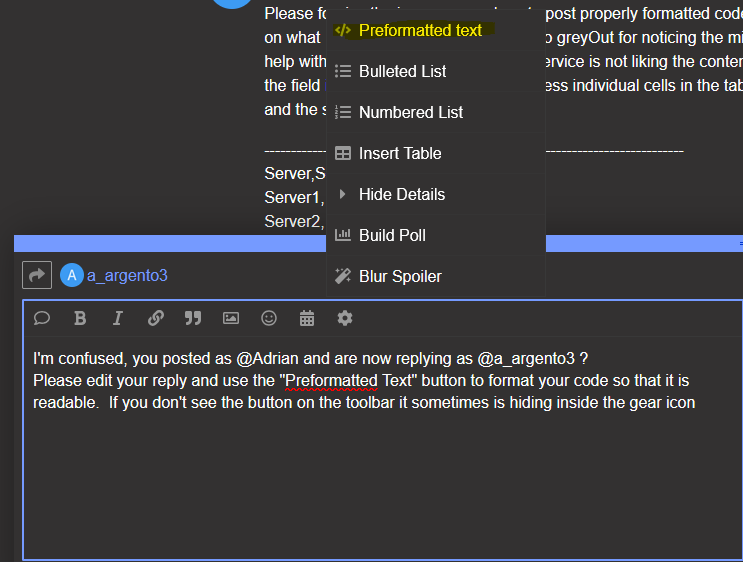
This will place 3 backticks on a line, then your text/code, and end with 3 backticks on a line by themself.
Same user on a different computer.
Do see the </> on the toolbar and have selected it in the edit, but don’t see any difference in the formatting.
But hopefully I got it. Thanks

Got it. See the 3 dots before and after now, thanks
$DataTable = New-Object Data.DataTable
$DateTime = (Get-Date).ToString("yyyy/MM/dd-hh:mm")
$Message1 = " Server being queried: "
$ServiceName = 'CohesityAgent'
$OutDataFile = "D:\SQL\Reports\Backups\CohesityAgentData.txt"

# Fill CSVData from the CSV file
$CSVData = Import-CSV "C:\Temp\test.csv"
# $CSVData looks like this
<#
Server  Service SvcStatus
------  ------- ---------
Server1
Server2
Server3

#>
Foreach ($Row in $CSVData) {
    $arrService = $null
    try {
        $arrService = Get-Service -ComputerName $($Row.Server) -Name $ServiceName -ErrorAction Stop
    } catch {
        $arrService = "Error"
    }
    $Row.Service = $ServiceName
    $Row.SvcStatus = $arrService.Status
}
I haven’t really worked with Table objects before in Powershell, so here’s how I would normally approach this. I don’t see the reason to involve the tables. You import the CSV which automatically converts the data to objects with the properties/values you need.
Then you loop through that array, checking the service for each server, and update the data in the array as you loop through.
Then somewhere after that you can use Export-CSV to save the data back to disk
$CSVData | Export-Csv -Path "C:\Path\To\Export.csv" -NoTypeInformation
Thank you for your kind reply (and putting up with my learning curve).
The reason I’d like to use the table is so that I can that generate a gui pane in where the service can be started if it is in the stopped condition and viceversa.
you got me there. I haven’t done anything with GUIs and powershell so I don’t know what the limitations are.
No worries, you were a BIG help to get me going. If anyone else can benefit from what I’ve created thus far with your help the functioning current table and .csv output is below. PowerShell is nice, but lrequires a LOT of learning.
When I arrive at my gui quest I will post for others to benefit from my learning.
Thanks again
# Declare
$ServiceName = 'CohesityAgent'
$OutDataFile = "D:\SQL\Reports\Backups\CohesityAgentData.txt"
$Columns = @("Server", "Service", "SvcStatus")
$NotFound ="Cohesity not Installed"

# Remove output file(s) if exists
if (Test-Path  "D:\SQL\Reports\New folder\CohesityAgentData.csv" ) { rm  "D:\SQL\Reports\New folder\CohesityAgentData.csv" }
# Remove file with who we queried
if (Test-Path  "D:\SQL\Reports\New folder\ServerQueried.log" ) { rm  "D:\SQL\Reports\New folder\ServerQueried.log" }

$table = $null
# Fill table from the CSV file
$table = Import-CSV "D:\SQL\Reports\Backups\NIPR_Server_List.csv"

Foreach ($Row in $table) {
    $arrService = $null
    try {
        $arrService = Get-Service -ComputerName $($Row.Server) -Name $ServiceName -ErrorAction Stop
    } catch {
        $arrService = "Error"

    }
    $Row.Service = $arrService.Name
    $Row.SvcStatus = $arrService.Status
    If ($arrService -eq "Error") {$Row.Service = $NotFound }  #{Write-host $Row.Server "Error"}
}
$table | Export-Csv -Path "D:\SQL\Reports\New folder\CohesityAgentData.csv" -NoTypeInformation