Hi, I am a newbie in PowerShell and I am trying to edit an Inventory script to get specified information about all computers from active Directory, including hard drives model and serial number.
My problem is that there are computers with more than one hard drives and the output is containing a space between the information. Here is the current output and the expected one.
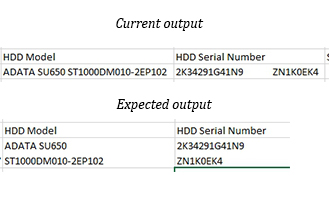
The script add space between two hdd models and I need to add a new line or carriage return character or add new row with the same Name, OperatingSystem, … and only the HDD model and HDD serial number to be different. I must mention that the output is csv and I have opened it in Excel.
Here is the script:
<#
.SYNOPSIS
  Name: Get-Inventory.ps1
  The purpose of this script is to create a simple inventory.

.DESCRIPTION
  This is a simple script to retrieve all computer objects in Active Directory and then connect
  to each one and gather basic hardware information using Cim. The information includes Manufacturer,
  Model,Serial Number, CPU, RAM, Disks, Operating System, Sound Deivces and Graphics Card Controller.

.NOTES
  Version 1.1
  Updated:      01-06-2018        - Replaced Get-WmiObject cmdlet with Get-WmiObject
                                  - Added Serial Number Information
                                  - Added Sound Device Information
                                  - Added Video Controller Information
                                  - Added option to send CSV file through email
                                  - Added parameters to enable email function option
  Release Date: 10-02-2018

  Author: Stephanos Constantinou
.EXAMPLES
  Get-Inventory.ps1
  Find the output under C:\Scripts_Output
  Get-Inventory.ps1 -Email -Recipients user1@domain.com
  Find the output under C:\Scripts_Output and an email will be sent
  also to user1@domain.com
  Get-Inventory.ps1 -Email -Recipients user1@domain.com,user2@domain.com
  Find the output under C:\Scripts+Output and an email will be sent
  also to user1@domain.com and user2@domain.com
#>
Param(
    [switch]$Email = $false,
    [string]$Recipients = $nulll
)
$Inventory = New-Object System.Collections.ArrayList
if ($Email -eq $true){
    $EmailCredentials =
        $host.ui.PromptForCredential("Need email credentials",
                                     "Provide the user that will be used to send the email.",
                                     "",
                                     "")
    $To  = @(($Recipients) -split ',')
    $Attachement = "d:\Inventory.csv"
    $From = $EmailCredentials.UserName
    $EmailParameters = @{
        To = $To
        Subject = "Inventory"
        Body = "Please find attached the inventory that you have requested."
        Attachments = $Attachement
        UseSsl = $True
        Port = "587"
        SmtpServer = "smtp.office365.com"
        Credential = $EmailCredentials
        From = $From}
}

$AllComputers = Get-ADComputer -Filter * -Properties Name
$AllComputersNames = $AllComputers.Name
Foreach ($ComputerName in $AllComputersNames) {
    $Connection = Test-Connection $ComputerName -Count 1 -Quiet
    $ComputerInfo = New-Object System.Object
    $ComputerOS = Get-ADComputer $ComputerName -Properties OperatingSystem,OperatingSystemServicePack
    $ComputerInfoOperatingSystem = $ComputerOS.OperatingSystem
    $ComputerInfoOperatingSystemServicePack = $ComputerOS.OperatingSystemServicePack
    $ComputerInfo | Add-Member -MemberType NoteProperty -Name "Name" -Value "$ComputerName" -Force
    $ComputerInfo | Add-Member -MemberType NoteProperty -Name "OperatingSystem" -Value $ComputerInfoOperatingSystem
    $ComputerInfo | Add-Member -MemberType NoteProperty -Name "ServicePack" -Value $ComputerInfoOperatingSystemServicePack
    if ($Connection -eq "True"){
        $ComputerHW = Get-WmiObject -Class Win32_ComputerSystem -ComputerName $ComputerName |
            select Manufacturer,
                   Model,
                   NumberOfProcessors,
                   @{Expression={$_.TotalPhysicalMemory / 1GB};Label="TotalPhysicalMemoryGB"}
        $ComputerCPU = Get-WmiObject win32_processor -ComputerName $ComputerName |
            select DeviceID,
                   Name,
                   Manufacturer,
                   NumberOfCores,
                   NumberOfLogicalProcessors
        $ComputerDisks = gwmi win32_diskdrive -ComputerName $ComputerName |
            select Model,
                   SerialNumber
      $ComputerSerial = (Get-WmiObject Win32_Bios -ComputerName $ComputerName).SerialNumber
      $ComputerGraphics = Get-WmiObject -Class Win32_VideoController |
        select Name,
               @{Expression={$_.AdapterRAM / 1GB};Label="GraphicsRAM"}
      $ComputerSoundDevices = (Get-WmiObject -Class Win32_SoundDevice).Name

      $ComputerInfoManufacturer = $ComputerHW.Manufacturer
      $ComputerInfoModel = $ComputerHW.Model
      $ComputerInfoNumberOfProcessors = $ComputerHW.NumberOfProcessors
      $ComputerInfoProcessorID = $ComputerCPU.DeviceID
      $ComputerInfoProcessorManufacturer = $ComputerCPU.Manufacturer
      $ComputerInfoProcessorName = $ComputerCPU.Name
      $ComputerInfoNumberOfCores = $ComputerCPU.NumberOfCores
      $ComputerInfoNumberOfLogicalProcessors = $ComputerCPU.NumberOfLogicalProcessors
      $ComputerInfoRAM = $ComputerHW.TotalPhysicalMemoryGB
      $ComputerInfoDriveModel = $ComputerDisks.Model
      $ComputerInfoDriveSN = $ComputerDisks.SerialNumber
      $ComputerInfoSize = $ComputerDisks.SizeGB
      $ComputerInfoGraphicsName = $ComputerGraphics.Name
      $ComputerInfoGraphicsRAM = $ComputerGraphics.GraphicsRAM
      $ComputerInfo | Add-Member -MemberType NoteProperty -Name "Manufacturer" -Value "$ComputerInfoManufacturer" -Force
      $ComputerInfo | Add-Member -MemberType NoteProperty -Name "Model" -Value "$ComputerInfoModel" -Force
      $ComputerInfo | Add-Member -MemberType NoteProperty -Name "Serial" -Value "$ComputerSerial" -Force
      $ComputerInfo | Add-Member -MemberType NoteProperty -Name "NumberOfProcessors" -Value "$ComputerInfoNumberOfProcessors" -Force
      $ComputerInfo | Add-Member -MemberType NoteProperty -Name "ProcessorID" -Value "$ComputerInfoProcessorID" -Force
      $ComputerInfo | Add-Member -MemberType NoteProperty -Name "ProcessorManufacturer" -Value "$ComputerInfoProcessorManufacturer" -Force
      $ComputerInfo | Add-Member -MemberType NoteProperty -Name "ProcessorName" -Value "$ComputerInfoProcessorName" -Force
      $ComputerInfo | Add-Member -MemberType NoteProperty -Name "NumberOfCores" -Value "$ComputerInfoNumberOfCores" -Force
      $ComputerInfo | Add-Member -MemberType NoteProperty -Name "NumberOfLogicalProcessors" -Value "$ComputerInfoNumberOfLogicalProcessors" -Force
      $ComputerInfo | Add-Member -MemberType NoteProperty -Name "RAM" -Value "$ComputerInfoRAM" -Force
      $ComputerInfo | Add-Member -MemberType NoteProperty -Name "HDD Model" -Value "$ComputerInfoDriveModel" -Force
      $ComputerInfo | Add-Member -MemberType NoteProperty -Name "HDD Serial Number" -Value "$ComputerInfoDriveSN" -Force
      $ComputerInfo | Add-Member -MemberType NoteProperty -Name "Size" -Value "$ComputerInfoSize"-Force
      $ComputerInfo | Add-Member -MemberType NoteProperty -Name "Graphics" -Value "$ComputerInfoGraphicsName"-Force
      $ComputerInfo | Add-Member -MemberType NoteProperty -Name "GraphicsRAM" -Value "$ComputerInfoGraphicsRAM" -Force
      $ComputerInfo | Add-Member -MemberType NoteProperty -Name "SoundDevices" -Value "$ComputerSoundDevices" -Force
   }
   $Inventory.Add($ComputerInfo) | Out-Null
   $ComputerHW = ""
   $ComputerCPU = ""
   $ComputerDisks = ""
   $ComputerSerial = ""
   $ComputerGraphics = ""
   $ComputerSoundDevices = ""
}
$Inventory | Export-Csv d:\Inventory.csv
if ($Email -eq $true){send-mailmessage @EmailParameters}
Thank you in advance!
