I’m trying to follow basic instructions and/or recommendation’s, two issue’s:
a) 1.6 Installing PowerShell – from “Month Of Lunches 4E”, has a passage that strongly recommends to “change the default console font to the Lucida fixed-width font.”
The “control box” referred to --does not have a ‘Properties’ listing in the right-click\menu, there is no left-click\menu.
b) PS> $profile results in C:\Users\<user-name>\Documents\WindowsPowerShell\Microsoft.PowerShell_profile.ps1
There is no C:\Users\<user-name>\Documents\WindowsPowerShell\. The path stops at
C:\Users\<user-name>\Documents. The following notepad $profile, also does not find the path output by the above command PS> $profile.
That said, where is the file that PS> $profile is pointing to? I have read where it says to create the file.pa1 if it doesn’t exist but, in this case, not only does the file.psinot exist, but its parent directory, also does not exist. How is PS> $profile outputting a destination that the OS itself cannot find. More importantly, what am I both not understanding and/or doing incorrectly?
I should say in advance that I never read the book.
That’s actually a matter of personal preference or taste. I use “Consolas” almost everywhere I use PowerShell. It should be a fixed-width font - yes, but you can choose whatever you like most.
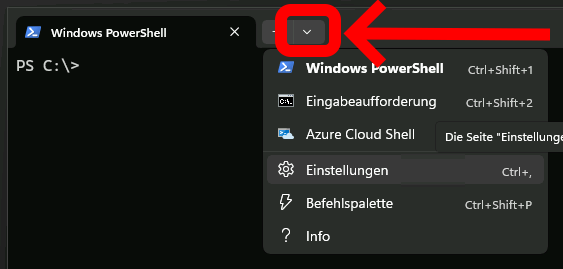
I cannot reproduce. You may share a screenshot of the “control box” on your system. You may be on the wrong spot.
The file (and the folder) does not exist until you create it. So you just need to create the folder and call notepad $profile. This should lead to a dialog box asking if you want to create the non existing file.
PowerShell will work just fine even without a profile. You only have to create a profile if you want to tweak how your PowerShell environment works.
@Olaf –
NOTE: Capturing a screenshot of a PowerShell menu is not very intuitive or obvious; try it yourself.
The outstanding issue is both 3E and 4E pdf’s have text alluding to the same “Control Box\Properties” recommendation, that is not where the book says it should be in this 5.1 version of PS. I have uploaded your requested screenshot below, showing a right-click menu.
@Olaf – In the original post it was mentioned “I have read where it says to create the file.pa1 if it doesn’t exist but …”. The outstanding question is, how is PSprompt> $Profile seeing, finding or, otherwise pointing to a nonexistent path and/or file, without an error?
@Olaf – That is exactly what I want to do. Specifically, to customize the PSprompt>.
(The screenshot is in German but I think you’ll get the idea. )
If the file exists it will be loaded. If it does not exist it will not be loaded. That’s all.
The file is not a necessary precondition. As I already said - PowerShell will work with its default settings just fine.
I guess you’re overthinking this a lot.
So what issues do you have? Are you not able to create the folder? Or do you have issues creating the file?
BTW: You should make sure to create the file with the correct name and extension. It is Microsoft.PowerShell_profile.ps1 - not file.pa1 or file.psi
Just out of curiousity: May I ask what background/where you’re comming from? Why do you want to learn PowerShell? Are you doing an apprenticeship? Do you want to improve your job skills? What’s the goal?
I’m also curious at this point. Between this post and @Query-01 previous post there’s been a lot of very in-depth discussion about the help system, and learning Powershell, but no hints at the driving force behind this.
Everyone learns their own way. In my personal experience, and the experience of others around me who have progressed in Powershell, it seems like having a task or a goal is very helpful. Like, a script that does XYZ, or automating a repetitive task, etc. Then learning how to make Powershell do that helps you learn.
I will annotate and trim some of the excess text (below) …
Thank you, prior to your reply I did click into and briefly browse around where your image indicates. However I was literally looking for the word ‘Properties’, as stated within the “Month Of Lunche’s” book’s. The word ‘Properties’ is replaced with “Settings”. I expected to see a drop-down menu, your image opens up a pocket sized dictionary of settings; I was not prepared for.
I’ve always been told I over-think things but in this case, it seems like common-sense. I am working within Win-11\Home; with the default PS 5.1. While I have read\skimmed over text about PS running within or on top of ‘Terminal’, I truly did not fully understand what that meant. I would select PowerShell from the ‘Terminal’ menu, then would continue as if --the GUI linked to --and opened up a PowerShell GUI and environment.
As you probably know, when you try to follow a non-existing path or open a non-existing file, Windows will throw an error. Which is what I was expecting, but does not seem to be the case with PSprompt> $Profile; lesson learned. I now have to watch-out for what other instances that may not result in expected output --the way the OS does.
This is just another reason confirming the use of this URL, to learn the PS help-system for the “Win-11\PS 5.1” install. From that URL, I could not grasp some of the basic get-help syntax usage, --which kind-of resulted in similar output behavior, I.E. if the get-help syntax had nothing to output, it would return a blank PSprompt. I then came to this forum, followed the suggestion to acquire “Month Of Lunches” and now, it appears I’m hitting similar speed-bumps understanding basic things; like the non-existing path issue above.
@Olaf – The exact issue I still do not understand is, if the complete path\to\file does not exist, where is PSprompt> $Profile getting populated from? I.E. the output of PSprompt> $Profile is to a non-existing path, which has me looking for something that does not exist.
I have no tenure with scripting or coding. I find scripts that come close to do what I need, research the the respective help-file, tweak until I understand and get the desired results; cmd.exe, “Visual Basic” MS Office. I learn and use as needed.
@Olaf@grey0ut – I’m trying to learn the “PowerShell help-system” as it relates to the “Window-11\PS 5.1” default install. From that point I should be able to figure out what other item’s I need to learn and understand as a replacement for cmd.exe. I do not want to focus on a particular script-task,
I know objectively this seems perfectly logical, but in reality it’s a bit like putting the cart before the horse. You’re getting lost in the weeds on little details instead of actually using PowerShell and getting comfortable with it.
But, your experiences already are teaching you things: Windows Terminal is not the same thing as Windows Powershell. Sometimes instructions are written for very specific examples, and they don’t always line up with how we might be doing it. It’s important to stay fluid, objective, and be an active observer and try to intuit your way through some of these speed bumps.
@grey0ut – I most definitely agree; lost in the weeds. In comparison to the way I’ve been learning things previously in association with cmd.exe, I began to feel like I was spinning wheel’s in the mud by picking apart other people’s script’s, then going to the help-file, in-order to understand, then tweak or re_write the script. I did learn but, that method truly felt like I was wasting time that could be better served by understanding, in this case, the basic’s of the PS\help-system, which is no doubt a bit more involved than the cmd.exe help file’s.
At this point the basic’s of the PS help-system is ‘my’ major speed-bump. The following is an example taken from my first post and is exactly how or where I begin to get lost --and where people say I am overthinking. Please bear with me …
Get-Help [-Category {Alias | Cmdlet | Provider | General | FAQ | Glossary | HelpFile | ScriptCommand | Function | Filter | ExternalScript | All | DefaultHelp | Workflow | DscResource | Class | Configuration}]
As I understand the above, it means:
PSprompt> Get-Help -Category {any | one | word | between | the | pipes | is | a | valid | Parameter}
PSprompt> Get-Help -Category Alias
The above will return all item’s in the ‘Alias’ category. However, PSprompt> Get-Help -Category Filter, returns an empty prompt. Yes, I do know there is not a ‘Filter’ category. @matt-bloomfield tried to explain this by saying " there was nothing to be returned for PSprompt> Get-Help -Category Filter.
To that I ask, --then why is | Filter | listed/grouped between {} as a valid parameter available to PSprompt> Get-Help -Category? That is a perfect example of my confusion, as well as a point where it’s being said I am overthinking; I prefer “lost in the weeds” .
Apologies if I bent a rule by bringing another post into this thread. I am all eye’s and ear’s on this.
Of course you can continue trying to figure out how exactly this works but IMHO there is not that much of a benefit for you.
It would not make you a better driver if you would know how a combustion engine works on a subatomic level.
For example: I am using PowerShell for 18 years now and I have never used the parameter -Category of the Get-Help cmdlet. Most of the time the default view of the help is enough to know what’s needed to step further. If not you may try the parameter -Full to see the complete help. Even worse … most of the time I don’t use the help inside the console at all. I prefer to use the online help if possible to have the help in a window next to the console or the VSCode window.
I’d recommend not to waste any more time and to move on to the next topic.
PS> Get-Help Category {Each | word | is | acceptable| parameter | input}
When writing your own Powershell parameter blocks (or user input) this is what’s known as ‘ValidateSet’. ValidateSet Help
You define a list of acceptable values for a parameter (or input). This allows the end-user to hit Tab to auto-fill acceptable values, or with the PSReadline module, it allows you to hit ctrl+space and enumerate the whole list, and then arrow key through the options.
From an author standpoint, ValidateSet is nice because you don’t have to account for every possible thing someone may type when using your script/function.
With regards to Get-Help -Category Filter not returning any output, it just means that you don’t currently have any help files that match that category. Not any different than using Get-ChildItem to return a specific file/path that doesn’t exist. It returns nothing
Your specific example is the exact “lost in the weeds” type of thing we’re talking about. That Get-Help was built with a category for Filter doesn’t mean that it should only that it can. Sounds like good planning/scripting to me. Now their cmdlet can handle that scenario when it arises.
I don’t have nearly the years of experience as others on this board, but I know enough to have authored several hundred script files, a few modules, and run a couple of user groups for Powershell locally. The most helpful uses for me with Get-Help are Get-Help Get-AdUser -ShowWindow
which will launch a new window showing the entire contents of the help for that cmdlet/function.
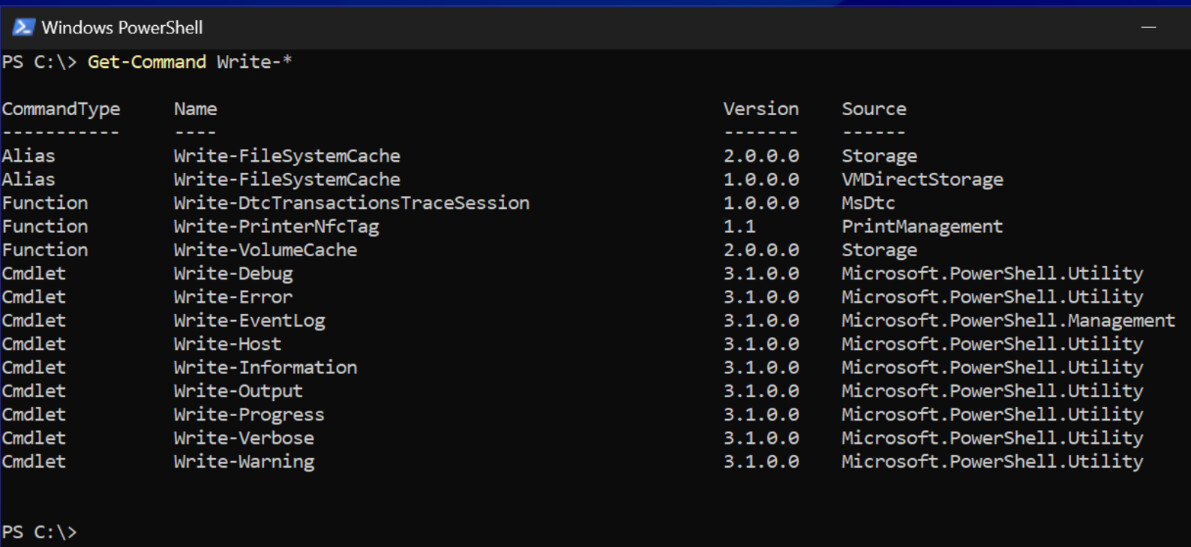
and while not help: Get-Command Write-*
@grey0ut@Olaf@matt-bloomfield – I thank you all for the feedback. My original thought to use the help-system as a somewhat structured learning tool, compared to a class-room setting, was misguided. Moving forward I’ll go back to first outlining --what task(s) I want to accomplish, research each individually, then finally figure-out how to glue them together in a .ps1; using the help-system on the Inet via a browser, coupled with powershell.org.
My past with cmd.exe is pretty basic stuff = recurse directories for text, manipulate and filter filenames, order filename output >> <filename.csv or some other file. In some instances I may want to open a media file in a player then pipe it to another process.
My need for PS started when I found out cmd.exe was limited when getting free\used storage-space in the TB range. The size and complexity of the batch file example’s gave me both an eye and headache, simultaneously.