# Provider cannot be found. It may not be properly installed
**URL:** https://forums.powershell.org/t/provider-cannot-be-found-it-may-not-be-properly-installed/18275
**Category:** PowerShell Help
**Created:** [January 5, 2022, 7:19pm UTC](https://forums.powershell.org/t/provider-cannot-be-found-it-may-not-be-properly-installed/18275 "2022-01-05T19:19:55Z")
**Posts on this page:** 11
**Page:** 1
### Author:  [@clearlymichele](https://forums.powershell.org/u/clearlymichele)
#### Post date: [January 5, 2022, 7:19pm UTC](https://forums.powershell.org/t/provider-cannot-be-found-it-may-not-be-properly-installed/18275/1 "2022-01-05T19:19:55Z")
I’m trying to query an access db/mdb file to get info, but get the above error when I open it. I can’t switch to 32 bit (if that would help) because everything I do is 64 bit.
I’m writing a powershell 5.1 script to query info from a mdb file based on [[this article](https://devblogs.microsoft.com/scripting/hey-scripting-guy-can-i-query-a-microsoft-access-database-with-a-windows-powershell-script/)][1]. I get this error message when I try to open/access an mdb file:
```
MDB Open next
Provider cannot be found. It may not be properly installed.
```
I’m pretty sure I need to adjust my connection info according to what I have installed. This is what I’m doing:
```
$pathViewBase = 'C:\Data\EndToEnd_view\' #View dir.
$XML_MDB_Dirs = @('\AppText.mdb') #more files later
foreach($mdbFile in $XML_MDB_Dirs)
{
$pathToMdb = Join-Path -Path $pathViewBase -ChildPath $mdbFile
if(Test-Path $pathToMdb)
{
$cn = new-object -comobject ADODB.Connection
$rs = new-object -comobject ADODB.Recordset
Write-Host "MDB Open next" -ForegroundColor DarkCyan
$cn.Open("Provider = Microsoft.Jet.OLEDB.4.0;Data Source = $pathToMdb") ###error this line
Write-Host "Open done" -ForegroundColor DarkCyan
$rs.Open(“SELECT TOP 1 [TableName].[Message Description],
[TableName].[Column1]
FROM [TableName]
WHERE [TableName].[Message Description] = 'ERROR'”,
$cn, $adOpenStatic, $adLockOptimistic)
$rs.MoveFirst()
Write-Host "Message value obtained for ERROR: " $rs.Fields.Item("Name").Value
Break ##########################
}#test-Path
}#foreach
```
I found this regarding [[odbc connections](https://stackoverflow.com/questions/21719422/getting-error-800a0e7a-provider-cannot-be-found-it-may-not-be-properly-install)][2], and it seems to say I need to adjust my connection info. Looking at what’s installed on my computer, I see this, but I’m a little unclear what I need to adjust my open code to use. Would I need to replace ‘Microsoft.Jet.OLEDB.4.0’ with ‘SQLNCLI11.dll’?
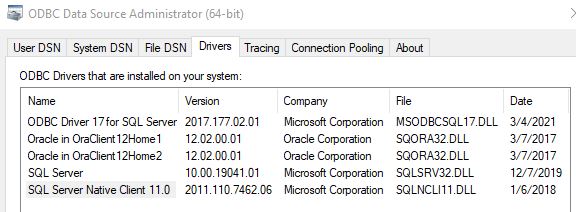
I checked,
> (Get-WmiObject Win32\_OperatingSystem).OSArchitecture
and I am running 64 bit powershell, so since I installed accessdatabaseengine\_x64.exe (and rebooted), that’s correct. But I still get the same error. I’m not sure if there’s something I could check to see if it’s installed correctly, or if I need to use SQLNCLI11.0 as the provider instead of Microsoft.Jet.OLEDB.4.0, or if I need to add “using” at the top? Or do I need to check if a powershell module is installed?
Update:
I looked again and it looks like the Access Driver turned up in the list now, but I still get that error. I’ll try what people suggested overnight and keep you posted. It won’t let me post the new picture since I’m a new user.
---
### Author:  [@tonyd](https://forums.powershell.org/u/tonyd)
#### Post date: [January 5, 2022, 10:28pm UTC](https://forums.powershell.org/t/provider-cannot-be-found-it-may-not-be-properly-installed/18275/2 "2022-01-05T22:28:48Z")
Although you dont show the exact error you are getting, I messed with this a while ago and never got it working, so I gave up and found another way. If this is the error you are getting, please make sure you post the solution if you find it as I am dying to know.
```auto
Provider cannot be found. It may not be properly installed.
At C:\Yada\Yada\Yada\queryAccessDB.PS1:9 char:1
+ $cn.Open("Provider = Microsoft.JET.OLEDB.4.0;Data Source = $db")
+ ~~~~~~~~~~~~~~~~~~~~~~~~~~~~~~~~~~~~~~~~~~~~~~~~~~~~~~~~~~~~~~~~
+ CategoryInfo : OperationStopped: (:) [], COMException
+ FullyQualifiedErrorId : System.Runtime.InteropServices.COMException
```
---
### Author:  [@matt-bloomfield](https://forums.powershell.org/u/matt-bloomfield)
#### Post date: [January 5, 2022, 10:35pm UTC](https://forums.powershell.org/t/provider-cannot-be-found-it-may-not-be-properly-installed/18275/3 "2022-01-05T22:35:10Z")
Hi, welcome to the forum 👋
After installing the Access Database Engine 64-bit, try the following connection string:
```auto
$cn.Open("Provider=Microsoft.ACE.OLEDB.12.0;Data Source = $pathToMdb")
```
Worth noting that you don’t have any Access Drivers in your screenshot, which should be visible after installing the Access Database Engine so you may have an installation problem as well as a problem with your connection string.
---
### Author:  [@tonyd](https://forums.powershell.org/u/tonyd)
#### Post date: [January 5, 2022, 10:42pm UTC](https://forums.powershell.org/t/provider-cannot-be-found-it-may-not-be-properly-installed/18275/4 "2022-01-05T22:42:48Z")
Matt, I have the following and am basically using the same code as the OP … any suggestions on the error I am getting?
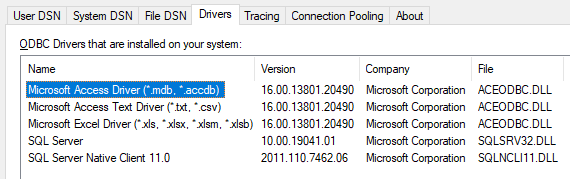
I suspect it is my connection string but everything I found in google suggests what I am using.
I tried the string you provided and got this:
```auto
Unrecognized database format 'C:\Yada\Yada\Yada\data.mdb'.
At C:\Yada\Yada\Yada\queryAccessDB.PS1:9 char:1
+ $cn.Open("Provider=Microsoft.ACE.OLEDB.12.0;Data Source = $db")
+ ~~~~~~~~~~~~~~~~~~~~~~~~~~~~~~~~~~~~~~~~~~~~~~~~~~~~~~~~~~~~~~~
+ CategoryInfo : OperationStopped: (:) [], COMException
+ FullyQualifiedErrorId : System.Runtime.InteropServices.COMException
```
---
### Author:  [@matt-bloomfield](https://forums.powershell.org/u/matt-bloomfield)
#### Post date: [January 5, 2022, 10:53pm UTC](https://forums.powershell.org/t/provider-cannot-be-found-it-may-not-be-properly-installed/18275/5 "2022-01-05T22:53:57Z")
@tonyd, Well it looks like it fixed the provider error 🙂
I’m not sure what would cause that, I’d have to set up a database here and see if I can replicate it.
---
### Author:  [@tonyd](https://forums.powershell.org/u/tonyd)
#### Post date: [January 5, 2022, 10:56pm UTC](https://forums.powershell.org/t/provider-cannot-be-found-it-may-not-be-properly-installed/18275/6 "2022-01-05T22:56:20Z")
Got it figured, changed your string to this since my version said 16:
```auto
"Provider=Microsoft.ACE.OLEDB.16.0;Data Source = $db"
```
Thanks Matt 🙂
---
### Author:  [@clearlymichele](https://forums.powershell.org/u/clearlymichele)
#### Post date: [January 6, 2022, 12:37pm UTC](https://forums.powershell.org/t/provider-cannot-be-found-it-may-not-be-properly-installed/18275/7 "2022-01-06T12:37:30Z")
Yes, that’s my error message. It’s within the top 10 lines of my question. 🙂
---
### Author:  [@clearlymichele](https://forums.powershell.org/u/clearlymichele)
#### Post date: [January 6, 2022, 12:52pm UTC](https://forums.powershell.org/t/provider-cannot-be-found-it-may-not-be-properly-installed/18275/8 "2022-01-06T12:52:12Z")
Thank you so much! I’ve been trying to figure this out for days! The error message went away. Awesome. 😄
I’m not sure who posted the answer first, but it won’t let me accept both solutions. Thank you all!
---
### Author:  [@clearlymichele](https://forums.powershell.org/u/clearlymichele)
#### Post date: [January 6, 2022, 1:38pm UTC](https://forums.powershell.org/t/provider-cannot-be-found-it-may-not-be-properly-installed/18275/9 "2022-01-06T13:38:03Z")
Please feel free to take a look at my new topic, since this error message went away, and when I try to get data retrieved, I get a new error that I’m trying to figure out.
---
### Author:  [@tonyd](https://forums.powershell.org/u/tonyd)
#### Post date: [January 6, 2022, 4:03pm UTC](https://forums.powershell.org/t/provider-cannot-be-found-it-may-not-be-properly-installed/18275/10 "2022-01-06T16:03:28Z")
Pretty sure Matt had the answer 🙂
Thanks Matt.
---
### Author:  [@dotnVo](https://forums.powershell.org/u/dotnVo)
#### Post date: [May 16, 2024, 8:19pm UTC](https://forums.powershell.org/t/provider-cannot-be-found-it-may-not-be-properly-installed/18275/11 "2024-05-16T20:19:52Z")