# Merge Multiple HTML file in One File with Powershell using iframerame

**URL:** <https://forums.powershell.org/t/merge-multiple-html-file-in-one-file-with-powershell-using-iframerame/22580>\
**Category:** PowerShell Help\
**Created:** [July 11, 2023, 1:10pm UTC](https://forums.powershell.org/t/merge-multiple-html-file-in-one-file-with-powershell-using-iframerame/22580 "2023-07-11T13:10:35Z")\
**Posts on this page:** 20\
**Page:** 1

<div class="post-metadata">

**Author:** ![dackey](https://avatars.discourse-cdn.com/v4/letter/d/71e660/32.png) [@dackey](https://forums.powershell.org/u/dackey)\
**Post date:** [July 11, 2023, 1:10pm UTC](https://forums.powershell.org/t/merge-multiple-html-file-in-one-file-with-powershell-using-iframerame/22580/1 "2023-07-11T13:10:35Z")

</div>

Hi !

I’ have a fisrt script who generate a HTML file(Array) in 4 servers, i need to Merge this 4 HTML files in one but using the Frame or iframe to have the Arrays side by side.

This first is working fine BUT i need to have all the HTML files.

```auto
$GE = "D:\VersionScriptsGE.html" 
$GB = "D:\VersionScriptsGB.html"
$GH = "D:\VersionScriptsGH.html"
$GS = "D:\VersionScriptsGS.html"

$ContenuGE = Get-Content $GE
$ContenuGB = Get-Content $GB
$ContenuGH = Get-Content $GH
$ContenuGS = Get-Content $GS

# Combinaison de toutes les pages HTML des Guichets
$VersionScripts = @"
<!DOCTYPE html>
<html>
<head>
  <title>Version des scripts des Guichets de la ""</title>
  <style>
  h1, h5, th {text-align: center;} 
    .image-container{
        display: flex;
        width: 100%;    
    }

    .image-container iframe{
        width= 25%;
        height: 400px;    
        border: auto;
    }
  </style>
</head>
<body>
    <h1>Version des scripts de la ""</h1>
    <center><div classs="iframe-container">
    <iframe src="<div>$ContenuGE</div>" width="400" height="850"></iframe>"
    <iframe src="<div>$ContenuGB</div>" width="400" height="850"></iframe>"
    <iframe src="<div>$ContenuGH</div>" width="400" height="850"></iframe>"
    <iframe src="<div>$ContenuGS</div>" width="400" height="850"></iframe>"
    </div></center>
</body>
</html>
"@

# Enregistrer le contenu dans un fichier HTML
$VersionScripts | Out-File -FilePath "D:\VersionScripts.html"

```

I want to do Merge the 4 HTML Files GE/GB/GH/GS in One

```auto
$GE = "D:\VersionScriptsCLUGE.html" 
$GB = "D:\VersionScriptsCLUGB.html"
$GH = "D:\VersionScriptsCLUGH.html"
$GS = "D:\VersionScriptsCLUGS.html"

$ContenuGE = Get-Content $GE
$ContenuGB = Get-Content $GB
$ContenuGH = Get-Content $GH
$ContenuGS = Get-Content $GS

$contenuRegroupe = "<html><head><center><title>Versions des Scripts</title></center></head><body>"
$contenuRegroupe += "<iframe src='data:text/html;base64';width='25%' height='100%'>$($ContenuGE -join "`n")</iframe>"
$contenuRegroupe += "<iframe src='data:text/html;base64,$([System.Convert]::ToBase64String([System.Text.Encoding]::UTF8.GetBytes($ContenuGB -join "`n")))' width='25%' height='100%'></iframe>"
$contenuRegroupe += "<iframe src='data:text/html;base64,$([System.Convert]::ToBase64String([System.Text.Encoding]::UTF8.GetBytes($ContenuGH -join "`n")))' width='25%' height='100%'></iframe>"
$contenuRegroupe += "<iframe src='data:text/html;base64,$([System.Convert]::ToBase64String([System.Text.Encoding]::UTF8.GetBytes($ContenuGS -join "`n")))' width='25%' height='100%'></iframe>"
$contenuRegroupe += "</body></html>"

Set-Content -Path "D:\Check_PSTD\VersionScriptsPSTD.html" -Value $contenuRegroupe

```

Not Working…

```auto
$GE = "D:\VersionScriptsGE.html" 
$GB = "D:\VersionScriptsGB.html"
$GH = "D:\VersionScriptsGH.html"
$GS = "D:\VersionScriptsGS.html"

$ContenuGE = Get-Content $GE
$ContenuGB = Get-Content $GB
$ContenuGH = Get-Content $GH
$ContenuGS = Get-Content $GS

# Combinaison de toutes les pages HTML des Guichets
$VersionScripts = @"
<!DOCTYPE html>
<html>
<head>
  <title>Version des scripts des Guichets de la ""</title>
  <style>
  h1, h5, th {text-align: center;} 
    .image-container{
        display: flex;
        width: 100%;    
    }

    .image-container iframe{
        width= 25%;
        height: 400px;    
        border: auto;
    }
  </style>
</head>
<body>
    <h1>Version des scripts de la ""</h1>
    <center><div classs="iframe-container">
    <iframe src="<div>$ContenuGE</div>" width="400" height="850"></iframe>"
    <iframe src="<div>$ContenuGB</div>" width="400" height="850"></iframe>"
    <iframe src="<div>$ContenuGH</div>" width="400" height="850"></iframe>"
    <iframe src="<div>$ContenuGS</div>" width="400" height="850"></iframe>"
    </div></center>
</body>
</html>
"@

# Enregistrer le contenu dans un fichier HTML
$VersionScripts | Out-File -FilePath "D:\VersionScripts.html"

```

I’m a noob in HTLM…!

Please Help 😉

---

<div class="post-metadata">

**Author:** ![neemobeer](https://sea1.discourse-cdn.com/flex019/user_avatar/forums.powershell.org/neemobeer/32/4087_2.png) [@neemobeer](https://forums.powershell.org/u/neemobeer)\
**Post date:** [July 11, 2023, 1:39pm UTC](https://forums.powershell.org/t/merge-multiple-html-file-in-one-file-with-powershell-using-iframerame/22580/2 "2023-07-11T13:39:50Z")

</div>

I would just point to the files for the iframe src=.

---

<div class="post-metadata">

**Author:** ![Olaf](https://sea1.discourse-cdn.com/flex019/user_avatar/forums.powershell.org/olaf/32/992_2.png) [@Olaf](https://forums.powershell.org/u/Olaf)\
**Post date:** [July 11, 2023, 1:42pm UTC](https://forums.powershell.org/t/merge-multiple-html-file-in-one-file-with-powershell-using-iframerame/22580/3 "2023-07-11T13:42:19Z")

</div>

Without knowing what kind of data you want to display and without knowing how you created the 4 already existing HTML files and without beeing a Web developer … I’d try to collect and assemble the data for all 4 servers as PowerShell objects and convert them to HTML afterwards.

---

<div class="post-metadata">

**Author:** ![dackey](https://avatars.discourse-cdn.com/v4/letter/d/71e660/32.png) [@dackey](https://forums.powershell.org/u/dackey)\
**Post date:** [July 11, 2023, 3:27pm UTC](https://forums.powershell.org/t/merge-multiple-html-file-in-one-file-with-powershell-using-iframerame/22580/4 "2023-07-11T15:27:50Z")

</div>

Hi Olaf and Neemobeer ^^

@Neemobeer: Yes i have done it, but i want to create another HTML File with all the content of the 4 others HTML File.

@Olaf: Ok i will show you Tomorrow, with the script who create the HTML and what i want to have 😉

Have a nice evening you both 😉

---

<div class="post-metadata">

**Author:** ![tonyd](https://sea1.discourse-cdn.com/flex019/user_avatar/forums.powershell.org/tonyd/32/1041_2.png) [@tonyd](https://forums.powershell.org/u/tonyd)\
**Post date:** [July 11, 2023, 4:18pm UTC](https://forums.powershell.org/t/merge-multiple-html-file-in-one-file-with-powershell-using-iframerame/22580/5 "2023-07-11T16:18:42Z")

</div>

> [@dackey](#):
>
> `<iframe src="<div>$ContenuGE</div>" width="400" height="850"></iframe>"`

Not sure if this is due to formatting, but you have a trailing quote on several lines.

I would side with Olaf on this one. If the 4 HTML files are designed to be standalone, they likely have meta, body and html tags that will mess you up if you dont deal with them.

---

<div class="post-metadata">

**Author:** ![dackey](https://avatars.discourse-cdn.com/v4/letter/d/71e660/32.png) [@dackey](https://forums.powershell.org/u/dackey)\
**Post date:** [July 12, 2023, 8:37am UTC](https://forums.powershell.org/t/merge-multiple-html-file-in-one-file-with-powershell-using-iframerame/22580/6 "2023-07-12T08:37:39Z")

</div>

Hi ^^,

The script i use to create the 4 HTML Files

```auto
clear
### Définition des variables ###
$scriptPath = Split-Path -Parent $MyInvocation.MyCommand.Definition
# Répertoire de fonction
$fileFonction = "\Function\fonction.psm1"

# Import des fonctions
Import-Module ((Split-Path -Parent $scriptPath) + $fileFonction) -Force -Verbose

$GX = ((Get-ChildItem "D:\Data" | Where{$_.Name -like "G*"}).Name).Split(" ")[0]
$PSTDPath = (Split-Path -Parent $scriptPath) + "\Scripts_$GX"
$TabInfosP = @()
$TabInfosMaj = @()

If((Test-Path "D:\VersionScripts$GX.html")){Remove-item -Path "D:\VersionScripts$GX.html"}

### Récupération des versions des scripts en production ###
$AllScripts = Get-ChildItem $PPath -Filter *.ps1
ForEach($scriptP in $AllScripts)
{
    $file = Get-Content $PPath\$($scriptP.Name)
    ForEach($i in $file)
    {
        If($i -like "*Version..*")
        {
            $Nom = [string]$scriptP
            $Nom = $Nom.split(".")[0]
            $version = $i.Split(" ")[2].replace("V","v")
            $Date = $i.split(" ")[4]
            $TabInfosP +=[pscustomobject]@{
                Nom = $Nom
                Script = $i
                Version = $version
                Date = $Date
            }
        }
    }
}
$Fct = Get-Content -Path ((Split-Path -Parent $scriptPath) + $fileFonction)
ForEach($f in $Fct)
{
    If($f -like "*Version..*")
    {
        $NomFct= [string]$fileFonction.Split("\")[2]
        $NomFct = $NomFct.Split(".")[0]
        $versionFct= $f.Split(" ")[2].replace("V","v")
        $DateFct= $f.split(" ")[4]
        $TabInfosP +=[pscustomobject]@{
            Nom = $NomFct
            Version = $versionFct
            Date = $DateFct
        }

    }
}

### Création du tableau Final pour une mise n page HTML ###
$TableFinal = @()
ForEach($SInfos in $TabInfosP)
{
    [string]$Version = $SInfos.version
    Switch($GX)
    {
        GE{$GY="d'Entrée"}
        GB{$GY="Bas"}
        GH{$GY="Haut"}
        GS{$GY="de Sortie"}
    }
    $TableFinal += [PSCustomObject]@{
        Guichet = $GY
        NomScript = $SInfos.Nom
        Version = $Version
        Date = $SInfos.date
    }
}

### Conversion HTML ###
# Page :

$Date = Get-Date -UFormat "%d%m%Y"
$UDate = Get-Date -UFormat "%d/%m/%Y"
$head = @"
<style>
h1, h5, th {text-align: center;} 
table { margin: 10px auto auto auto; font-family: Segoe UI; box-shadow: 10px 10px 5px #888; border: thin ridge grey; }
th { background: #0046c3; color: #fff; max-width: 400px; padding: 5px 10px; }
td { font-size : 12px; padding: 5px 20px; color: #000; }
tr { background: #b8d1f3; }
tr:nth-child(even) { background: #dae5f4; }
tr:nth-child(odd) { background: #b8d1f3; }
</style>
"@
$head
$body1 ="<h1>Versions Scripts $GY</h1> <h5>$UDate</h5>"
$TableFinal | ConvertTo-Html -Property NomScript,Version,Date,VersionFonction,DateFonction -Head $head -Body $body1 | Out-File "D:\VersionScripts$GX.html" -Force

```

So Yes each times there is meta, body and html tags.

The Final result i want is this

 ![Final-sansNom](https://us1.discourse-cdn.com/flex019/uploads/powershell/original/2X/6/63acc533f65ff78b349758729eefd3ae32d19c14.png)

Is it possible with Powershell to have this résult without to have the 4 HTML Files.

---

<div class="post-metadata">

**Author:** ![Olaf](https://sea1.discourse-cdn.com/flex019/user_avatar/forums.powershell.org/olaf/32/992_2.png) [@Olaf](https://forums.powershell.org/u/Olaf)\
**Post date:** [July 12, 2023, 11:52am UTC](https://forums.powershell.org/t/merge-multiple-html-file-in-one-file-with-powershell-using-iframerame/22580/7 "2023-07-12T11:52:09Z")

</div>

Wow, your code is confusing … 🤔 …

Anyway … in a similar project I used to convert the individual page elements into HTML fragments with the parameter `-Fragment` of the cmdlet `ConvertTo-Html`, joined them later on with the proper pre and post content together and formatted everything with a CSS file and arranged the elements on the page with flexbox so that they show next to each other as long as they have enough space.

---

<div class="post-metadata">

**Author:** ![dackey](https://avatars.discourse-cdn.com/v4/letter/d/71e660/32.png) [@dackey](https://forums.powershell.org/u/dackey)\
**Post date:** [July 12, 2023, 1:48pm UTC](https://forums.powershell.org/t/merge-multiple-html-file-in-one-file-with-powershell-using-iframerame/22580/8 "2023-07-12T13:48:09Z")

</div>

Hello Olaf ^^,

Ok i will try.

Keep you in touch 😉

---

<div class="post-metadata">

**Author:** ![dackey](https://avatars.discourse-cdn.com/v4/letter/d/71e660/32.png) [@dackey](https://forums.powershell.org/u/dackey)\
**Post date:** [July 13, 2023, 9:28am UTC](https://forums.powershell.org/t/merge-multiple-html-file-in-one-file-with-powershell-using-iframerame/22580/9 "2023-07-13T09:28:27Z")

</div>

Hello All ^^,

I have generate a first HTML file with the option -Fragment, but we do not have any style

```auto
<table>
<colgroup><col/><col/><col/></colgroup>
<tr><th>NomScript</th><th>Version</th><th>Date</th></tr>
<tr><td>GE-CreateFTPHome</td><td>v2.3</td><td>22/02/2022</td></tr>
<tr><td>GE-MajAV</td><td>v1.0</td><td>16/07/2019</td></tr>
<tr><td>GE-MajCrl</td><td>v2.1</td><td>17/03/2023</td></tr>
<tr><td>GE-MajDmu</td><td>v1.1</td><td>17/03/2023</td></tr>
<tr><td>GE-MajEpo</td><td>v2.1</td><td>17/03/2023</td></tr>
<tr><td>GE-MajEpoV2KO</td><td>v2.0</td><td>15/01/2022</td></tr>
<tr><td>GE-MajImageCL</td><td>v2.1</td><td>17/03/2023</td></tr>
<tr><td>GE-MajKAV</td><td>v2.1</td><td>17/03/2023</td></tr>
<tr><td>GE-MajPatchCL</td><td>v2.1</td><td>17/03/2023</td></tr>
<tr><td>GE-MajSccm</td><td>v1.1</td><td>17/03/2023</td></tr>
<tr><td>GE-MajWsus</td><td>v2.1</td><td>17/03/2023</td></tr>
<tr><td>GE-PurgeConnexionsError</td><td>v1.0</td><td>25/06/2020</td></tr>
<tr><td>GE-PurgeFileUpload</td><td>v1.0</td><td>25/06/2020</td></tr>
<tr><td>GE-PurgeFolder</td><td>v2.2</td><td>06/02/2023</td></tr>
<tr><td>GE-PurgeHash</td><td>v1.0</td><td>03/01/2019</td></tr>
<tr><td>GE-PurgeLog</td><td>v2.0</td><td>01/03/2022</td></tr>
<tr><td>GE-PurgeLogHash</td><td>v2.0</td><td>01/03/2022</td></tr>
<tr><td>GE-PurgeLogKav</td><td>v1.0</td><td>25/06/2020</td></tr>
<tr><td>GE-SecurePassword</td><td>v1.0</td><td>04/02/2019</td></tr>
<tr><td>GE-StartAll</td><td>v2.5.1</td><td>19/12/2022</td></tr>
<tr><td>GE-Tasks</td><td>v1.2</td><td>22/02/2023</td></tr>
<tr><td>fonction</td><td>v2.7.3</td><td>04/01/2023</td></tr>
</table>

```

After i make a function to merge with frame

```auto
# Function to generate separate iframes for each HTML fragment
function Generate-FragmentIframes {
    param (
        [Parameter(Mandatory = $true)]
        [string[]]$InputFiles,
        [Parameter(Mandatory = $true)]
        [string]$OutputFile
    )

    # Create a new HTML document
    $outputContent = "<html><body>"

    foreach ($file in $InputFiles) {
        # Read the content of the fragment file
        $content = Get-Content $file -Raw

        # Generate an iframe with the fragment content
        $iframeContent = "<iframe srcdoc='$content'></iframe>"

        # Append the iframe to the output document
        $outputContent += $iframeContent
    }

    # Close the HTML body and document tags
    $outputContent += "</body></html>"

    # Save the HTML output to the output file
    $outputContent | Set-Content -Path $OutputFile -Force
}

# Usage example
$fragmentFiles = @("D:\Check_PSTD\VersionScriptsPSTDGE.html", "D:\Check_PSTD\VersionScriptsPSTDGB.html", "D:\Check_PSTD\VersionScriptsPSTDGH.html", "D:\Check_PSTD\VersionScriptsPSTDGS.html")
$outputFile = "D:\Check_PSTD\VersionScriptsPSTD.html"

Generate-FragmentIframes -InputFiles $fragmentFiles -OutputFile $outputFile

```

But The file VersionScriptsPSTD.html is white with borders…

 ![Result-MergeFramentIframes](https://us1.discourse-cdn.com/flex019/uploads/powershell/original/2X/b/bb7265a8d0cbeb75959c3ce8c95fb9da0be1a01b.png)

I don’t understand why the content is not display in the iframe…

The source of the white file

```auto
<html><head><body><iframe srcdoc='<table>
<colgroup><col/><col/><col/></colgroup>
<tr><th>NomScript</th><th>Version</th><th>Date</th></tr>
<tr><td>GE-CreateFTPHome</td><td>v2.3</td><td>22/02/2022</td></tr>
<tr><td>GE-MajAV</td><td>v1.0</td><td>16/07/2019</td></tr>
<tr><td>GE-MajCrl</td><td>v2.1</td><td>17/03/2023</td></tr>
<tr><td>GE-MajDmu</td><td>v1.1</td><td>17/03/2023</td></tr>
<tr><td>GE-MajEpo</td><td>v2.1</td><td>17/03/2023</td></tr>
<tr><td>GE-MajEpoV2KO</td><td>v2.0</td><td>15/01/2022</td></tr>
<tr><td>GE-MajImageCL</td><td>v2.1</td><td>17/03/2023</td></tr>
<tr><td>GE-MajKAV</td><td>v2.1</td><td>17/03/2023</td></tr>
<tr><td>GE-MajPatchCL</td><td>v2.1</td><td>17/03/2023</td></tr>
<tr><td>GE-MajSccm</td><td>v1.1</td><td>17/03/2023</td></tr>
<tr><td>GE-MajWsus</td><td>v2.1</td><td>17/03/2023</td></tr>
<tr><td>GE-PurgeConnexionsError</td><td>v1.0</td><td>25/06/2020</td></tr>
<tr><td>GE-PurgeFileUpload</td><td>v1.0</td><td>25/06/2020</td></tr>
<tr><td>GE-PurgeFolder</td><td>v2.2</td><td>06/02/2023</td></tr>
<tr><td>GE-PurgeHash</td><td>v1.0</td><td>03/01/2019</td></tr>
<tr><td>GE-PurgeLog</td><td>v2.0</td><td>01/03/2022</td></tr>
<tr><td>GE-PurgeLogHash</td><td>v2.0</td><td>01/03/2022</td></tr>
<tr><td>GE-PurgeLogKav</td><td>v1.0</td><td>25/06/2020</td></tr>
<tr><td>GE-SecurePassword</td><td>v1.0</td><td>04/02/2019</td></tr>
<tr><td>GE-StartAll</td><td>v2.5.1</td><td>19/12/2022</td></tr>
<tr><td>GE-Tasks</td><td>v1.2</td><td>22/02/2023</td></tr>
<tr><td>fonction</td><td>v2.7.3</td><td>04/01/2023</td></tr>
</table>
'></iframe><iframe srcdoc='<table>
<colgroup><col/><col/><col/></colgroup>
<tr><th>NomScript</th><th>Version</th><th>Date</th></tr>
<tr><td>GE-CreateFTPHome</td><td>v2.3</td><td>22/02/2022</td></tr>
<tr><td>GE-MajAV</td><td>v1.0</td><td>16/07/2019</td></tr>
<tr><td>GE-MajCrl</td><td>v2.1</td><td>17/03/2023</td></tr>
<tr><td>GE-MajDmu</td><td>v1.1</td><td>17/03/2023</td></tr>
<tr><td>GE-MajEpo</td><td>v2.1</td><td>17/03/2023</td></tr>
<tr><td>GE-MajEpoV2KO</td><td>v2.0</td><td>15/01/2022</td></tr>
<tr><td>GE-MajImageCL</td><td>v2.1</td><td>17/03/2023</td></tr>
<tr><td>GE-MajKAV</td><td>v2.1</td><td>17/03/2023</td></tr>
<tr><td>GE-MajPatchCL</td><td>v2.1</td><td>17/03/2023</td></tr>
<tr><td>GE-MajSccm</td><td>v1.1</td><td>17/03/2023</td></tr>
<tr><td>GE-MajWsus</td><td>v2.1</td><td>17/03/2023</td></tr>
<tr><td>GE-PurgeConnexionsError</td><td>v1.0</td><td>25/06/2020</td></tr>
<tr><td>GE-PurgeFileUpload</td><td>v1.0</td><td>25/06/2020</td></tr>
<tr><td>GE-PurgeFolder</td><td>v2.2</td><td>06/02/2023</td></tr>
<tr><td>GE-PurgeHash</td><td>v1.0</td><td>03/01/2019</td></tr>
<tr><td>GE-PurgeLog</td><td>v2.0</td><td>01/03/2022</td></tr>
<tr><td>GE-PurgeLogHash</td><td>v2.0</td><td>01/03/2022</td></tr>
<tr><td>GE-PurgeLogKav</td><td>v1.0</td><td>25/06/2020</td></tr>
<tr><td>GE-SecurePassword</td><td>v1.0</td><td>04/02/2019</td></tr>
<tr><td>GE-StartAll</td><td>v2.5.1</td><td>19/12/2022</td></tr>
<tr><td>GE-Tasks</td><td>v1.2</td><td>22/02/2023</td></tr>
<tr><td>fonction</td><td>v2.7.3</td><td>04/01/2023</td></tr>
</table>
'></iframe></body></head></html>

```

---

<div class="post-metadata">

**Author:** ![tonyd](https://sea1.discourse-cdn.com/flex019/user_avatar/forums.powershell.org/tonyd/32/1041_2.png) [@tonyd](https://forums.powershell.org/u/tonyd)\
**Post date:** [July 13, 2023, 4:17pm UTC](https://forums.powershell.org/t/merge-multiple-html-file-in-one-file-with-powershell-using-iframerame/22580/10 "2023-07-13T16:17:14Z")

</div>

> [@dackey](#):
>
> ```auto
> # Create a new HTML document
> $outputContent = "<html><body>"
> 
> ```

In a previous post, you defined your Style entries in $head, add that back in before your loop.

```auto
# Create a new HTML document
    $outputContent = "<html><head>$head</head><body>"

```

---

<div class="post-metadata">

**Author:** ![Olaf](https://sea1.discourse-cdn.com/flex019/user_avatar/forums.powershell.org/olaf/32/992_2.png) [@Olaf](https://forums.powershell.org/u/Olaf)\
**Post date:** [July 14, 2023, 12:17am UTC](https://forums.powershell.org/t/merge-multiple-html-file-in-one-file-with-powershell-using-iframerame/22580/11 "2023-07-14T00:17:15Z")

</div>

I don’t know enough about web development to be able to actually judge on that topic but I doubt that iframe is the best way to go for your purpose. 🤷🏼‍♂️

As I mentioned above I used another approach for a similar requirement.

Since you did not provide some sample data for us to play around with I will use the services on a system to show what I meant.

You can run this code as it is …

```auto
@'
.flexbox-container {
    display: flex;
    flex-wrap: wrap;
    justify-content: space-around;
    align-items: flex-start;
    gap: 15px;
    margin: 20px;
}

.flexbox-item {
    color: black;
    font-family: 'Consolas', Courier, monospace;
    border-style: solid;
    border-width: 5px;
    justify-content: center;
    align-content: center;
    background-color: lightgrey;
    border-radius: 20px;
    box-shadow: 10px 10px 5px grey;
    padding: 0 .75em 0;
    min-width: 270px;
    max-width: 700px;
    flex-grow: 1;
}

.A_Services {
    border-color: darkblue;
}

.B_Services {
    border-color: red;
}

.C_Services {
    border-color: orange;
    max-width: 900px;
}

.E_Services {
    border-color: darkgreen;
}

h1 {
    color: darkblue;
    text-align: center;
}

table{
    border-spacing: 0;
    border-collapse: collapse;
    border-radius: .5em;
    overflow: hidden;
}

table, th, td {
    border-collapse: collapse;
    border: 1px solid dimgrey;
    text-align: left;
    margin: auto;
    margin-bottom: 20px;
    padding: 0.3em;
    word-wrap: break-word;
}

td {
    max-width: 300px;
    min-width: 100px;
}

tr:nth-child(odd) {
    background-color:lightgrey;
}
tr:nth-child(even) {
    background-color:whitesmoke;
}
'@ |
    Out-File -FilePath (Join-Path -Path $Env:APPDATA -ChildPath 'style.css')

$TimeStamp = Get-Date -Format 'yyyy-MM-dd_HH-mm-ss'
$outFile = Join-Path -Path $Env:APPDATA -ChildPath ($ENV:COMPUTERNAME + '_'+ $TimeStamp + '.html')

$A_Services_PreContent = @'
<div class="flexbox-item A_Services">
    <h1>A_Services</h1>
    <p>
'@

$B_Services_PreContent = @'
<div class="flexbox-item B_Services">
    <h1>B_Services</h1>
    <p>
'@

$C_Services_PreContent = @'
<div class="flexbox-item C_Services">
    <h1>C_Services</h1>
    <p>
'@

$E_Services_PreContent = @'
<div class="flexbox-item E_Services">
    <h1>E_Services</h1>
    <p>
'@

$PostContent = @'
    </p>
</div>
'@

$A_Services = Get-Service -Name a*
$B_Services = Get-Service -Name b*
$C_Services = Get-Service -Name c*
$E_Services = Get-Service -Name e*

$A_Services_HTML = 
$A_Services |
Select-Object -Property Name, Status |
ConvertTo-Html -As Table -Fragment -PreContent $A_Services_PreContent -PostContent $PostContent
$B_Services_HTML = 
$B_Services |
Select-Object -Property Name, Status |
ConvertTo-Html -As Table -Fragment -PreContent $B_Services_PreContent -PostContent $PostContent

$C_Services_HTML = 
$C_Services |
Select-Object -Property Name, Status |
ConvertTo-Html -As Table -Fragment -PreContent $C_Services_PreContent -PostContent $PostContent
$E_Services_HTML = 
$E_Services |
Select-Object -Property Name, Status |
ConvertTo-Html -As Table -Fragment -PreContent $E_Services_PreContent -PostContent $PostContent

$ConvertToThmlParams = @{
    Body = "<div class=""flexbox-container""> $A_Services_HTML $B_Services_HTML $C_Services_HTML $E_Services_HTML </div>"
    Title = 'A, B, C and E-Services'
    CssUri = 'style.css'
}

ConvertTo-Html @ConvertToThmlParams | 
    Out-File -FilePath $outFile
Invoke-Item -Path $outFile

```

First it will create a CSS file in the output folder.  
Then it queries the services on the local system and creates 4 data sets from services starting with the letters `a`, `b`, `c` and `e`. Then it creates HTML fragments for each data set and adds the according PRE and POST content. Then it concatenates all fragments to a complete HTML page, links the CSS style sheet file and outputs it to a file in the AppData folder of the currently logged on user. The last action is to invoke this HTML file with the default browser of the system.

As you can see - as long as the browser window is wide enough you get all 4 data sets next to each other. If the browser window width shrinks the individual boxes with the data sets jump to the next _line_.

---

<div class="post-metadata">

**Author:** ![dackey](https://avatars.discourse-cdn.com/v4/letter/d/71e660/32.png) [@dackey](https://forums.powershell.org/u/dackey)\
**Post date:** [July 25, 2023, 3:13pm UTC](https://forums.powershell.org/t/merge-multiple-html-file-in-one-file-with-powershell-using-iframerame/22580/12 "2023-07-25T15:13:37Z")

</div>

Hello Olaf ^^,

Sorry i was seek.

I will try today and tomorrow with your Script 😉

---

<div class="post-metadata">

**Author:** ![dackey](https://avatars.discourse-cdn.com/v4/letter/d/71e660/32.png) [@dackey](https://forums.powershell.org/u/dackey)\
**Post date:** [July 25, 2023, 3:21pm UTC](https://forums.powershell.org/t/merge-multiple-html-file-in-one-file-with-powershell-using-iframerame/22580/13 "2023-07-25T15:21:12Z")

</div>

The problem is the same i want to display like this  
A\_services B\_Services C\_Services D\_Services  
a b c d

It’s all the difficulty…

---

<div class="post-metadata">

**Author:** ![Olaf](https://sea1.discourse-cdn.com/flex019/user_avatar/forums.powershell.org/olaf/32/992_2.png) [@Olaf](https://forums.powershell.org/u/Olaf)\
**Post date:** [July 25, 2023, 4:12pm UTC](https://forums.powershell.org/t/merge-multiple-html-file-in-one-file-with-powershell-using-iframerame/22580/14 "2023-07-25T16:12:37Z")

</div>

I really don’t know what you mean. If I run my code suggestion as it is I get this result:
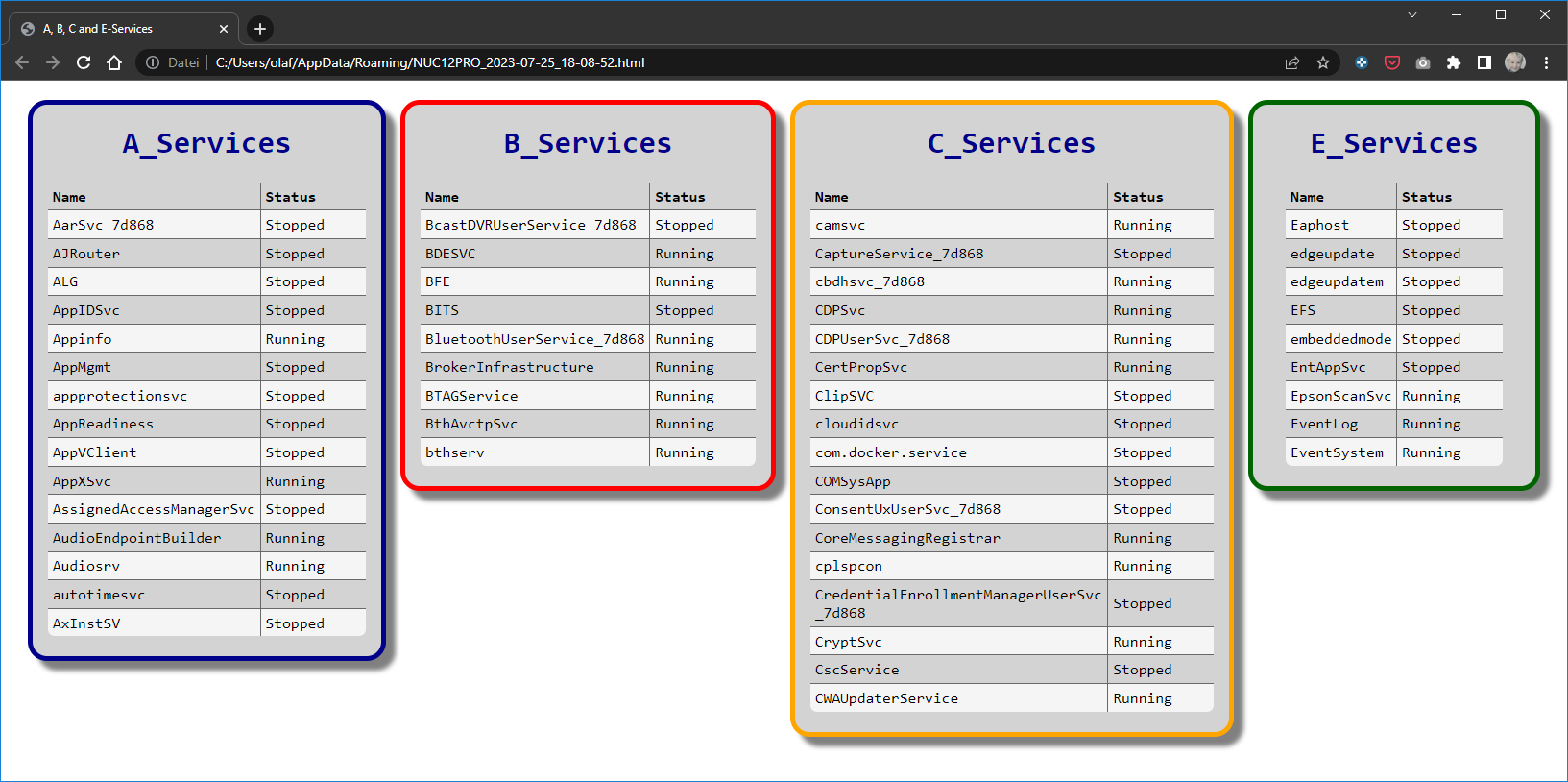
 ![image](https://us1.discourse-cdn.com/flex019/uploads/powershell/original/2X/f/f98978ecb96a4e5c1dbd5c09ce1af28cf76f921c.png)

Of course you can tweak the CSS to produce the layout as you like it. But apart from that what’s wrong? 🤔

---

<div class="post-metadata">

**Author:** ![dackey](https://avatars.discourse-cdn.com/v4/letter/d/71e660/32.png) [@dackey](https://forums.powershell.org/u/dackey)\
**Post date:** [July 25, 2023, 6:40pm UTC](https://forums.powershell.org/t/merge-multiple-html-file-in-one-file-with-powershell-using-iframerame/22580/15 "2023-07-25T18:40:30Z")

</div>

Oh…?? when i run it, i do not have a result like that… i will check tomorrow.  
It will be nice ^^

---

<div class="post-metadata">

**Author:** ![dackey](https://avatars.discourse-cdn.com/v4/letter/d/71e660/32.png) [@dackey](https://forums.powershell.org/u/dackey)\
**Post date:** [July 25, 2023, 6:42pm UTC](https://forums.powershell.org/t/merge-multiple-html-file-in-one-file-with-powershell-using-iframerame/22580/16 "2023-07-25T18:42:06Z")

</div>

I ve understand, it’s the browser who are to older 😉

I will modify your script for my need 😉

Thx a lot Olaf 😉

---

<div class="post-metadata">

**Author:** ![Olaf](https://sea1.discourse-cdn.com/flex019/user_avatar/forums.powershell.org/olaf/32/992_2.png) [@Olaf](https://forums.powershell.org/u/Olaf)\
**Post date:** [July 25, 2023, 7:09pm UTC](https://forums.powershell.org/t/merge-multiple-html-file-in-one-file-with-powershell-using-iframerame/22580/17 "2023-07-25T19:09:08Z")

</div>

> [@dackey](#):
>
> it’s the browser who are to older

What browser are you using?? … Netscape Navigator? 🤔

---

<div class="post-metadata">

**Author:** ![dackey](https://avatars.discourse-cdn.com/v4/letter/d/71e660/32.png) [@dackey](https://forums.powershell.org/u/dackey)\
**Post date:** [July 25, 2023, 7:43pm UTC](https://forums.powershell.org/t/merge-multiple-html-file-in-one-file-with-powershell-using-iframerame/22580/18 "2023-07-25T19:43:14Z")

</div>

Lol No, but IE worth !!  
at Job.  
Here i have chrome update.

---

<div class="post-metadata">

**Author:** ![Olaf](https://sea1.discourse-cdn.com/flex019/user_avatar/forums.powershell.org/olaf/32/992_2.png) [@Olaf](https://forums.powershell.org/u/Olaf)\
**Post date:** [July 25, 2023, 7:49pm UTC](https://forums.powershell.org/t/merge-multiple-html-file-in-one-file-with-powershell-using-iframerame/22580/19 "2023-07-25T19:49:30Z")

</div>

Hasn’t the support for Internet Explorer stopped about a year ago?

> **[Use Internet Explorer in Windows 10 - Microsoft Support](https://support.microsoft.com/en-us/windows/use-internet-explorer-in-windows-10-7248a101-d5dd-bded-d843-d9427c42d60f)**
>
> Internet Explorer 11 support ended on June 15, 2022. We recommend you use Microsoft Edge for a faster, more secure and more modern web browsing experience.

---

<div class="post-metadata">

**Author:** ![dackey](https://avatars.discourse-cdn.com/v4/letter/d/71e660/32.png) [@dackey](https://forums.powershell.org/u/dackey)\
**Post date:** [July 25, 2023, 7:52pm UTC](https://forums.powershell.org/t/merge-multiple-html-file-in-one-file-with-powershell-using-iframerame/22580/20 "2023-07-25T19:52:16Z")

</div>

Yes i know but i do not have installed Edge at work, so i just have old ie lol.

But i do not think about.

[Next page](https://forums.powershell.org/t/merge-multiple-html-file-in-one-file-with-powershell-using-iframerame/22580.md?page=2)
