# Flip words in textfile OR make it work anyway?
**URL:** https://forums.powershell.org/t/flip-words-in-textfile-or-make-it-work-anyway/15360
**Category:** PowerShell Help
**Created:** [December 9, 2020, 2:46am UTC](https://forums.powershell.org/t/flip-words-in-textfile-or-make-it-work-anyway/15360 "2020-12-09T02:46:31Z")
**Posts on this page:** 11
**Page:** 1
### Author:  [@botany0culinary](https://forums.powershell.org/u/botany0culinary)
#### Post date: [December 9, 2020, 2:46am UTC](https://forums.powershell.org/t/flip-words-in-textfile-or-make-it-work-anyway/15360/1 "2020-12-09T02:46:31Z")
**1.)** Is there a way to flip words from a textfile.txt ?
| From: | To: |
| Ärna:Tänka Ärnade:Tänkte Ärnar:Tänker | Tänka:Ärna Tänkte:Ärnade Tänker:Ärnar |
I use this in the script, but I want to make it able to revert what was made, I did flip "$find(?=\W)", $replace" to "$replace(?=\W)", $find", but it slows down in the way (its about 3000 words its checking) and does sometimes crash and gives wierd output.
**2.)** Or is it possible to solve it some other way to get this to work without flipping the words in the textfile.txt?
`$ord = Get-Content $Path\textfile.xml -encoding utf8`
`Get-Content $Path\textfile.xml -encoding utf8 | foreach {`
`$find, $replace = $_ -split ‘:’`
`((Get-Content $FileBrowser.FileName -encoding utf8) -creplace “$find(?=\W)”, $replace) | Set-Content $FileBrowser.FileName -encoding utf8`
---
### Author:  [@botany0culinary](https://forums.powershell.org/u/botany0culinary)
#### Post date: [December 9, 2020, 3:13am UTC](https://forums.powershell.org/t/flip-words-in-textfile-or-make-it-work-anyway/15360/2 "2020-12-09T03:13:00Z")
I know “[array]::Reverse()” maybe used? But I can’t figure out how.
But how do I make the split between the ‘:’ ? Also some have two words after the ‘:’ otherwise it’s just this i got. And it doe not what I want.
$words = Get-Content -Path c:\textfile.txt
$results = foreach ($word in $words){$name -replace '(\w+) (\w+)','$2 $1'}
$results | Out-File c:\done.txt
---
### Author:  [@matt-bloomfield](https://forums.powershell.org/u/matt-bloomfield)
#### Post date: [December 9, 2020, 3:23am UTC](https://forums.powershell.org/t/flip-words-in-textfile-or-make-it-work-anyway/15360/3 "2020-12-09T03:23:02Z")
Can be done on one line but I’ve split it at the | for readability on the forum.
```
Get-Content E:\Temp\dictionary.txt |
foreach {$_ -replace $_,(($_ -split ':')[1,0] -join ':') |
Out-File E:\Temp\reversedDictionary.txt -Append}
```
---
### Author:  [@botany0culinary](https://forums.powershell.org/u/botany0culinary)
#### Post date: [December 9, 2020, 4:50am UTC](https://forums.powershell.org/t/flip-words-in-textfile-or-make-it-work-anyway/15360/4 "2020-12-09T04:50:47Z")
Thank you, that did the trick.
---
### Author:  [@random-commandline](https://forums.powershell.org/u/random-commandline)
#### Post date: [December 9, 2020, 4:51am UTC](https://forums.powershell.org/t/flip-words-in-textfile-or-make-it-work-anyway/15360/5 "2020-12-09T04:51:10Z")
```
$result = Get-Content .\name.txt | ForEach-Object {
$name = $_ -split ':'
"{0}:{1}" -f $name[1],$name[0]
}
Add-Content -Path .\newname.txt -Value $result
```
---
### Author:  [@rob-simmers](https://forums.powershell.org/u/rob-simmers)
#### Post date: [December 9, 2020, 4:59am UTC](https://forums.powershell.org/t/flip-words-in-textfile-or-make-it-work-anyway/15360/6 "2020-12-09T04:59:34Z")
Another method is using Reverse:
```
$names = @"
Ärna:Tänka
Ärnade:Tänkte
Ärnar:Tänker
"@ -split [environment]::NewLine
foreach ($name in $names) {
$arr = $name -split ":"
[array]::Reverse($arr)
[pscustomobject]@{
'OriginalName' = $name
'ReverseName' = $arr -join ':'
}
}
```
Output:
```
OriginalName ReverseName
------------ -----------
Ärna:Tänka Tänka:Ärna
Ärnade:Tänkte Tänkte:Ärnade
Ärnar:Tänker Tänker:Ärnar
```
---
### Author:  [@botany0culinary](https://forums.powershell.org/u/botany0culinary)
#### Post date: [December 9, 2020, 5:45am UTC](https://forums.powershell.org/t/flip-words-in-textfile-or-make-it-work-anyway/15360/7 "2020-12-09T05:45:15Z")
Thank you all for the answers! I have tried all they do the work!
For the other question:
I do replace the first word with the second word from the textfile in another textfile that contains a mixture of many words. Is it possible to do replace the second word with the first word in the textfile? I did put up a code I use but it does not work so good, crashes and does weird things with the textfile it’s replacing word in.
(It’s related watching this two alternatives, i can’t figure t out completely why its buggy and does not work that way, cause it works with the first word and replacing with the other)
---
### Author:  [@rob-simmers](https://forums.powershell.org/u/rob-simmers)
#### Post date: [December 9, 2020, 5:52am UTC](https://forums.powershell.org/t/flip-words-in-textfile-or-make-it-work-anyway/15360/8 "2020-12-09T05:52:35Z")
Glad the samples are working as expected. As you did before, provide examples of the text files and expected outcome.
---
### Author:  [@adminofthings](https://forums.powershell.org/u/adminofthings)
#### Post date: [December 9, 2020, 6:36am UTC](https://forums.powershell.org/t/flip-words-in-textfile-or-make-it-work-anyway/15360/9 "2020-12-09T06:36:38Z")
Using -replace, you can do the following:
```
(Get-Content file.txt -encoding utf8) -replace '^([^:]+):(.*)$','$2:$1' |
Set-Content file.txt -encoding UTF8
```
---
### Author:  [@botany0culinary](https://forums.powershell.org/u/botany0culinary)
#### Post date: [December 9, 2020, 7:21pm UTC](https://forums.powershell.org/t/flip-words-in-textfile-or-make-it-work-anyway/15360/10 "2020-12-09T19:21:14Z")
[quote quote=278115]Glad the samples are working as expected. As you did before, provide examples of the text files and expected outcome.
[/quote]
_(I solved it, read under the picture…)_
I did try a txt-file used only 1 word. and it ended up just after a few seconds to a gigantic text-file of 284 mb and it didn’t make all. And the output is really hard to open. But something is wrong. The word shown here is not even in the text-file.
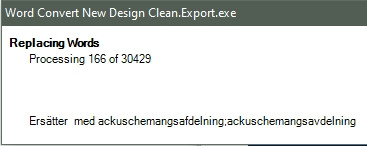
**However** , After a good night sleep and woken fresh like a cucumber I did find out that I didn’t do a # to inactivate the line used before so I guesse it had some problem with that. So now everything is working, pheuw!
Thank you all for your help!
---
### Author:  [@dotnVo](https://forums.powershell.org/u/dotnVo)
#### Post date: [May 16, 2024, 8:28pm UTC](https://forums.powershell.org/t/flip-words-in-textfile-or-make-it-work-anyway/15360/11 "2024-05-16T20:28:09Z")