Ok I added the transcript line to the script. Result is that the task just keeps running for a long time before timing out with nothing else happening. Even the transcript text which I placed in the script is not being produced.
Ok, then please post a picture of the “Actions” section again and also provide the exact text from the fields.
Program/script:
C:\Windows\System32\WindowsPowerShell\v1.0\powershell.exe
Add arguments:
-ExecutionPolicy Bypass -File “C:\Users\nal2u\OneDrive\Desktop\Interview Package\Coding Examples\Power Shell\Event Viewer Loged Errors and Warnings.ps1”
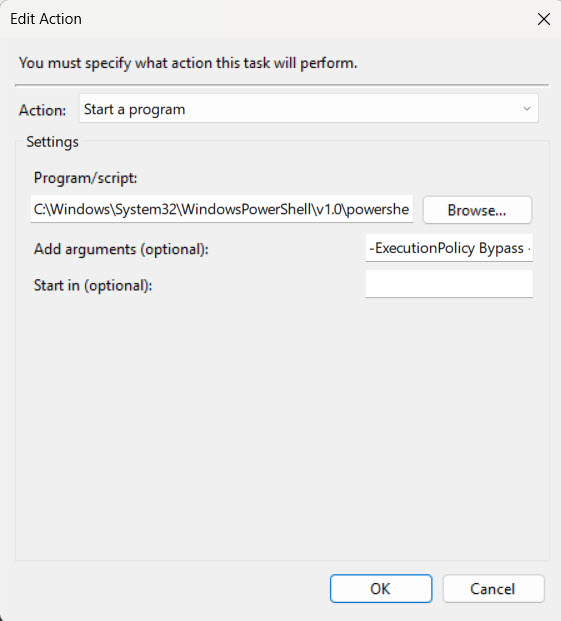
ok, that actually looks spot-on. Just to be sure I checked a few scheduled tasks on my computer and they’re pretty much the same syntax-wise.
If the current state is that the task just runs and runs and runs and nothing ever happens then it could still be a Powershell code issue.
Can you paste the current code from your Powershell script “Event Viewer Loged Errors and Warnings.ps1” and we’ll take a look (redact any sensitive information of course)
Sure thing and again… thanks so much for all the time you are putting into this effort for me. It is TRULY appreciated Grey!!!
Start-Transcript -path c:\temp\MyTranscript.txt
[Net.ServicePointManager]::SecurityProtocol = [Net.SecurityProtocolType]::Tls12
# Define the event logs to extract
$logArray = @("Application", "System", "Security", "Setup")
#, "Forwarded Events"
# Provide the path to store the log file extraction
$destinationPath = "C:\WindowsEventLogs\"

# Get the current date in YearMonthDay format
$logDate = Get-Date -Format yyyyMMddHHmm

# Initialize an empty array to store log entries
$output = @()

# new method
$EventSession = New-Object System.Diagnostics.Eventing.Reader.EventLogSession
foreach ($log in $logArray) {
    $destination = Join-Path $destinationPath "$env:COMPUTERNAME-$log-$logDate.evtx"
    Write-Host "Extracting the $log file now."
    $EventSession.ExportLog($Log,'LogName',"*[System[(Level=2 or Level=3)]]",$Destination)
}

#Create Zip File
$7zipPath = "$env:ProgramFiles\7-Zip\7z.exe"

if (-not (Test-Path -Path $7zipPath -PathType Leaf)) {
    throw "7 zip executable '$7zipPath' not found"
}

Set-Alias Start-SevenZip $7zipPath

$Source = "c:\WindowsEventLogs\*.evtx"
$Target = "c:\WindowsEventLogs\EventLog.zip"

Start-SevenZip a -mx=9 $Target $Source


# Send the log file via email
$smtpServer = "smtp.mail.yahoo.com"
$smtpPort = 587
$smtpUsername = "nal2us2@yahoo.com"
$smtpPassword = "***"

$smtp = New-Object System.Net.Mail.SmtpClient($smtpServer, $smtpPort)
$smtp.Credentials = New-Object System.Net.NetworkCredential($smtpUsername, $smtpPassword)
$smtp.EnableSsl = $true

$mail = New-Object System.Net.Mail.MailMessage
$mail.From = "nal2us2@yahoo.com"
$mail.To.Add("nal2us2@yahoo.com")
$mail.Subject = "Event Viewer Log Issues"
$mail.Body = "The following are the Errors and Warnings logged from the Event Viewer Over-Night"
$Attachment = [system.net.mail.attachment]::new("C:\WindowsEventLogs\EventLog.zip")
$Mail.Attachments.Add($Attachment)
$smtp.Send($mail)
ok, follow along with me as i quote parts of the code and make recommendations.
Start-Transcript -path c:\temp\MyTranscript.txt
Great, BUT, you have to have a Stop-Transcript at the end (last line of your script).
# Initialize an empty array to store log entries
$output = @()
this code does nothing and I’ve removed it several times in my examples to you. Remove it.
I see you’re still using the .NET method for sending mail instead of the Send-MailMessage method I proposed, but I don’t specifically see any issues with it.
Mostly, add the Stop-Transcript cmdlet to the end of the script and try again and see if you get a transcript file.
Ugh!!! $output = @() removed and Stop Transcript Command added. No change. Same thing… Task manager continues running but nothing else happening. Very frustrating. I’m sure its something simple in my code but for the life of me I cant figure out what. Could it be an environment variable that needs to be added and if so what?
I don’t know what environment variable would be relevant here.
Is there a file here?
c:\temp\MyTranscript.txt
The transcript starting should create this file and start recording things. If that file doesn’t exist then it kind of implies that the powershell script is never executing. If it does exist, let’s look at the contents.
Here is the current code as it stands:
Start-Transcript -path c:\temp\MyTranscript.txt
[Net.ServicePointManager]::SecurityProtocol = [Net.SecurityProtocolType]::Tls12
# Define the event logs to extract
$logArray = @("Application", "System", "Security", "Setup")
#, "Forwarded Events"
# Provide the path to store the log file extraction
$destinationPath = "C:\WindowsEventLogs\"

# Get the current date in YearMonthDay format
$logDate = Get-Date -Format yyyyMMddHHmm

# new method
$EventSession = New-Object System.Diagnostics.Eventing.Reader.EventLogSession
foreach ($log in $logArray) {
    $destination = Join-Path $destinationPath "$env:COMPUTERNAME-$log-$logDate.evtx"
    Write-Host "Extracting the $log file now."
    $EventSession.ExportLog($Log,'LogName',"*[System[(Level=2 or Level=3)]]",$Destination)
}

#Create Zip File
$7zipPath = "$env:ProgramFiles\7-Zip\7z.exe"

if (-not (Test-Path -Path $7zipPath -PathType Leaf)) {
    throw "7 zip executable '$7zipPath' not found"
}

Set-Alias Start-SevenZip $7zipPath

$Source = "c:\WindowsEventLogs\*.evtx"
$Target = "c:\WindowsEventLogs\EventLog.zip"

Start-SevenZip a -mx=9 $Target $Source


# Send the log file via email
$smtpServer = "smtp.mail.yahoo.com"
$smtpPort = 587
$smtpUsername = "nal2us2@yahoo.com"
$smtpPassword = "
***"

$smtp = New-Object System.Net.Mail.SmtpClient($smtpServer, $smtpPort)
$smtp.Credentials = New-Object System.Net.NetworkCredential($smtpUsername, $smtpPassword)
$smtp.EnableSsl = $true

$mail = New-Object System.Net.Mail.MailMessage
$mail.From = "nal2us2@yahoo.com"
$mail.To.Add("nal2us2@yahoo.com")
$mail.Subject = "Event Viewer Log Issues"
$mail.Body = "The following are the Errors and Warnings logged from the Event Viewer Over-Night"
$Attachment = [system.net.mail.attachment]::new("C:\WindowsEventLogs\EventLog.zip")
$Mail.Attachments.Add($Attachment)
$smtp.Send($mail)
Stop-Transcript
I didn’t ask for the code again, we need to know if your transcript file was created and if it was if it has contents.
Sorry for the misunderstanding. No… transcript file was not created.
ok, then the script isn’t running.
Have you tried manually running the script from Powershell without going through all the task scheduler bits?
Absolutely!!!
It works just fine that way… running it manually without the Task Scheduler
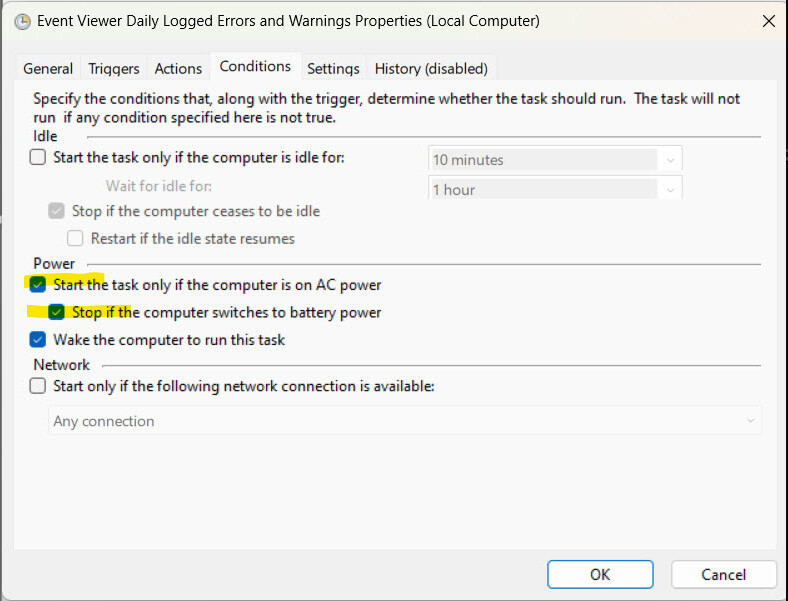
No I am no AC power with both of the highlighted boxes check that you have indicated in your screen shot.
ok then the only other thing that may be an issue is the location of the script, but most likely not.
This is the current path of the script from one of your comments:
C:\Users\nal2u\OneDrive\Desktop\Interview Package\Coding Examples\Power Shell\Event Viewer Loged Errors and Warnings.ps1
it also looks like from other comments you’ve got a C:\Temp directory. Try copying the script to
C:\Temp\Event Viewer Loged Errors and Warnings.ps1
and then update your scheduled task action to:
-ExecutionPolicy Bypass -File “C:\Temp\Event Viewer Loged Errors and Warnings.ps1”
As i’m copying/pasting that I noticed that the word “Logged” is spelled “Loged”. Is it possible that typo is the problem?
The word was changed from “Loged” to “Logged”.
PS script has been changed from old location to “temp” folder on the C Drive and, again, successfully run manually w/o Task Scheduler and unsuccessfully WITH Task Scheduler.
A big mystery indeed.

try changing the “Program/script” field to just “powershell” and see what happens as well.
That worked. Thank you for ALL your persistence on this one!!!
Thats it… Done Deal. You are truly the best!!!
what a journey! Congrats!!