# Changing a parameter in a configuration file via PowerShell.
**URL:** https://forums.powershell.org/t/changing-a-parameter-in-a-configuration-file-via-powershell/5422
**Category:** PowerShell Help
**Created:** [December 23, 2015, 3:44am UTC](https://forums.powershell.org/t/changing-a-parameter-in-a-configuration-file-via-powershell/5422 "2015-12-23T03:44:42Z")
**Posts on this page:** 7
**Page:** 1
### Author:  [@mj-ross](https://forums.powershell.org/u/mj-ross)
#### Post date: [December 23, 2015, 3:44am UTC](https://forums.powershell.org/t/changing-a-parameter-in-a-configuration-file-via-powershell/5422/1 "2015-12-23T03:44:42Z")
What am I doing wrong here? I just need to replace the "shared\_buffers = 32MB value to 256MB in a configuration file(s)?
(Get-Content F:\hp\UCMDB\DataFlowProbe\pgsql\data\postgresql.conf)
|ForEach-Object {$\_ -replace “shared\_buffers = 32MB”, “shared\_buffers = 256MB”}
|Set-Content F:\hp\UCMDB\DataFlowProbe\pgsql\data\postgresql.conf
Thank you for any help you could offer?
---
### Author:  [@system](https://forums.powershell.org/u/system)
#### Post date: [December 23, 2015, 4:00am UTC](https://forums.powershell.org/t/changing-a-parameter-in-a-configuration-file-via-powershell/5422/2 "2015-12-23T04:00:54Z")
That code works. When you remove the final pipe and Set-Content cmdlet, does it write the correct data to the screen? My first thought is that you’re working with a read-only file; however, that would probably indicate an error. Maybe not, so try the Set-Content cmdlet with the -Force parameter. Speaking of errors, are you seeing any errors; you didn’t indicate that one way, or another.
---
### Author:  [@mj-ross](https://forums.powershell.org/u/mj-ross)
#### Post date: [December 23, 2015, 5:51am UTC](https://forums.powershell.org/t/changing-a-parameter-in-a-configuration-file-via-powershell/5422/3 "2015-12-23T05:51:58Z")
I have removed the | and the script seems to execute but the change never seems to take place. I am getting a mess at the end of the script echo:
cmdlet set-content at command pipeline position 1
Supply values for the following parameters:
Value{0}:
it seems if i make an entry - the entire file go to blank.
TYVM
---
### Author:  [@system](https://forums.powershell.org/u/system)
#### Post date: [December 23, 2015, 6:27am UTC](https://forums.powershell.org/t/changing-a-parameter-in-a-configuration-file-via-powershell/5422/4 "2015-12-23T06:27:13Z")
The “Value” error at the end is indicating that nothing is being supplied to the Set-Content cmdlet’s mandatory -Value parameter. Type Set-Content by itself into the PowerShell console and you’ll see what I mean. In fact, you’ll see this with any cmdlet, or function, that requires a specific parameter(s) have a value when it’s run.
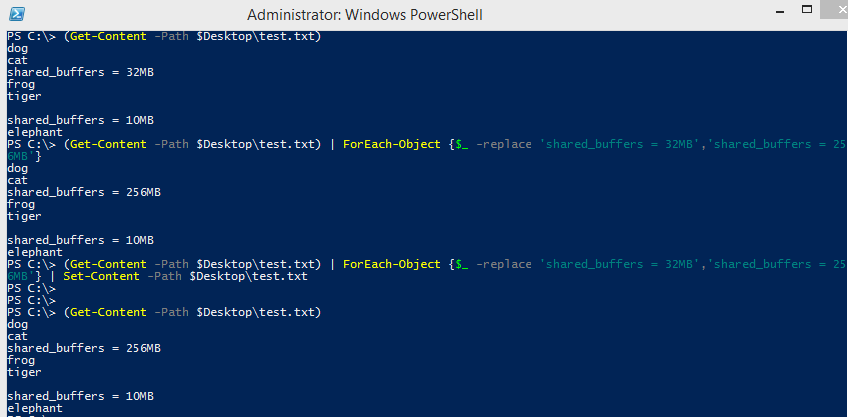
I have this working with an example file that (at times), both did, and didn’t contain ‘shared\_buffers = 32MB’ and it worked. I’m not sure what else to say. Can you post the beginning to end run, so we can see everything? Providing my image shows below, you should be able to see this worked for me.
---
### Author:  [@max-kozlov](https://forums.powershell.org/u/max-kozlov)
#### Post date: [December 23, 2015, 5:09pm UTC](https://forums.powershell.org/t/changing-a-parameter-in-a-configuration-file-via-powershell/5422/5 "2015-12-23T17:09:24Z")
Split your code by Pipe, but LEAVE the pipe at the end of line!
(Get-Content F:\hp\UCMDB\DataFlowProbe\pgsql\data\postgresql.conf) **|**
ForEach-Object {$\_ -replace “shared\_buffers = 32MB”, “shared\_buffers = 256MB”} **|**
Set-Content F:\hp\UCMDB\DataFlowProbe\pgsql\data\postgresql.conf
---
### Author:  [@mj-ross](https://forums.powershell.org/u/mj-ross)
#### Post date: [December 25, 2015, 1:01am UTC](https://forums.powershell.org/t/changing-a-parameter-in-a-configuration-file-via-powershell/5422/6 "2015-12-25T01:01:06Z")
The pipe at the END of the line did the trick and the code is working as desired. I can’t say thanks enough.
---
### Author:  [@dotnVo](https://forums.powershell.org/u/dotnVo)
#### Post date: [May 16, 2024, 8:43pm UTC](https://forums.powershell.org/t/changing-a-parameter-in-a-configuration-file-via-powershell/5422/7 "2024-05-16T20:43:25Z")